Value driven
Samsung Galaxy J3 (2016) review: Value driven
Phonebook and telephony
The Samsung Galaxy J3 (2016) has a strong reception and good in-call audio. It comes with either one or two SIM cards (two micro), the Duos version has dual-standby. Only one card has access to 3G and 4G networks, the other is for 2G calls.
The call log is visible behind the keypad (you can hide that to view the full list) and it shows which SIM was used to place/take the call on the Dual SIM model. You can also filter the log by which SIM was used. The other two tabs show your favorite contacts and all your contacts.

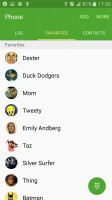
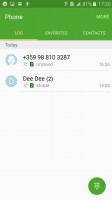
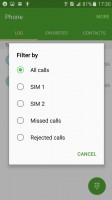
Dialer • Favorites • Call log
The Phonebook is a list of contacts with a search field and an alphabet index. The contact info card has been cleaned up and shows the contact image (you can swipe down to view it fully), below that are the phones and emails with quick buttons to call/send message.
Here you'll also find the latest messages and calls with that contact. The View more toggle displays all the additional info. You can swipe left to call a contact straight from the list, right to send them a message.


The phonebook reminds you the last chat you had with a contact
The built-in call rejection feature lets you block calls from certain numbers or all numbers not in your phonebook. Do not disturb mode can be scheduled on select days and during certain periods of the day. You can set it to make an exception for certain notifications, including allowing only calls from your favorite contacts.


Blocking spam calls • Do not disturb mode
The single loudspeaker on the Samsung Galaxy J3 proved rather unimpressive. On a positive note, it does feature a slight bump, which is really a necessity, considering its position on the back panel. By contrast, the J5 (2016) and J7 (2016) employ Samsung's new grill design that is absolutely flat and can be muffled a lot easier. Other than that, however, the Galaxy J3 (2016) was quiet in all three tests, scoring a final Below Average mark.
| Speakerphone test | Voice, dB | Ringing | Overall score | |
| 62.0 | 62.1 | 66.6 | Below Average | |
| 64.1 | 65.3 | 68.5 | Below Average | |
| 66.3 | 66.2 | 65.9 | Below Average | |
| 66.7 | 65.8 | 66.9 | Below Average | |
| 66.0 | 64.3 | 70.1 | Below Average | |
| 66.1 | 65.5 | 70.6 | Average | |
| 66.5 | 64.6 | 71.7 | Average | |
| 66.1 | 65.8 | 71.0 | Average | |
| 64.5 | 71.0 | 68.9 | Average | |
| 65.9 | 64.6 | 75.6 | Average | |
| 65.7 | 66.6 | 76.5 | Good | |
| 66.5 | 66.6 | 75.8 | Good | |
| 74.7 | 66.6 | 72.3 | Good | |
| 73.2 | 66.6 | 77.5 | Good | |
| 75.7 | 69.6 | 75.9 | Very Good | |
| 76.9 | 73.6 | 82.7 | Excellent |
Messaging
The default messaging app is Samsung's own Messages. It has a clean looking UI and lets you can customize font size, backgrounds and speech bubble style. You can use pinch zoom to change the font size in a conversation thread. We didn't find the custom wallpaper/bubble styles though.
Receiving a new message displays a popup that lets you view or quickly reply to a message, a handy functionality that Hangouts lacks.


The Messages app handles multimedia attachments
A built-in spam filter weeds out messages from select numbers or containing certain phrases. You can also schedule messages to be automatically sent later (so you don't forget).


Customizing the look • fighting spam
The Samsung-modified Email app looks almost identical. The top row is a shortcut to show emails only from just priority contacts or you can view a combined inbox if you have multiple accounts added.
The Gmail app also handles multiple accounts - even ones not on Gmail - and adheres more strictly to Material design principles. Add push notifications and we end up using it more often than the Email app.
The Samsung keyboard features a dedicated numbers row. You can assign preset phrases to them so simple messages like "on my way" can be typed in a second. You can add text shortcuts (so 'brb' gets replaced with 'be right back') and there's predictive text.
You can tweak the size of the keyboard slightly, making it taller or shorter.


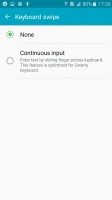
Setting up text shortcuts • resizing the keyboard • gestures
It can update its database with popular words weekly and learn from your messages and contacts. Swiping can be set to move the text cursor or as an input method. Unfortunately, there's no floating mini keyboard though.


The Samsung keyboard


Tip us
2.1m 180k
RSS
EV
Merch
Log in I forgot my password Sign up