Windows Phone 8.1 camera demoed on video

Time for yet another Windows Phone 8.1 video demo – this time it focuses on the revamped camera interface. The camera UI on Windows Phone 8 was the one of the most innovative interfaces of recent years and the 8.1 update builds on that.
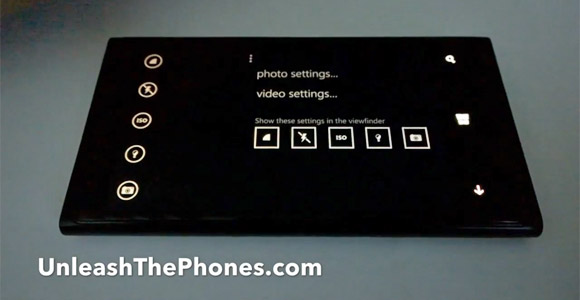
The default WP8.1 camera is called Microsoft Camera. Changes to it include a column of settings on the left side of the screen. Those can be customized with any five of the multiple settings available in the camera.
Also, a Burst shot button has been placed between the Still and Video mode buttons. Unsaved bursts are deleted after 7 days by default to save space, but you can change that setting.
An option in the Settings menu groups photos by time and location, which we've seen in galleries on iOS and Android.
As a bonus, you can see a glimpse of the Cortana live tile at 2:22. The same uploader has a two minute video showing off the upcoming virtual assistant, which you might want to check if you are into voice operation.
Reader comments
- Anonymous
- niy
"The camera UI on Windows Phone 8 was the one of the most innovative interfaces of recent years" Not on my 520. You must mean the Nokia Pro Cam app?
- M and M
- dPN
This interface looks a lot like the nokia camera interface, in fact the button configuration and design is identical. Did they merge Nokia and MS camera into one app??





Tip us
2.1m 180k
RSS
EV
Merch
Log in I forgot my password Sign up