Check Price
Popularity
Voting results
- Design
-
8.3
- Features
-
7.7
- Performance
-
7.1
| General | 2G Network | GSM 850 / 900 / 1800 / 1900 |
|---|---|---|
| 3G Network | HSDPA 900 / 2100 | |
| HSDPA 850 / 1900 / 2100 | ||
| SIM | Mini-SIM | |
| Announced | 2013, January | |
| Status | Available. Released 2013, February |
| Body | Dimensions | 115 x 61.2 x 12.2 mm (4.53 x 2.41 x 0.48 in) |
|---|---|---|
| Weight | 122 g (4.30 oz) |
| Display | Type | TFT capacitive touchscreen, 256K colors |
|---|---|---|
| Size | 320 x 480 pixels, 3.5 inches (~165 ppi pixel density) | |
| Multitouch | Yes |
| Sound | Alert types | Vibration; MP3 ringtones |
|---|---|---|
| Loudspeaker | Yes | |
| 3.5mm jack | Yes |
| Memory | Card slot | microSD, up to 32 GB |
|---|---|---|
| Internal | 4 GB (2 GB user available), 512 MB RAM |
| Data | GPRS | Yes |
|---|---|---|
| EDGE | Yes | |
| Speed | HSDPA 7.2 Mbps | |
| WLAN | Wi-Fi 802.11 b/g/n, Wi-Fi hotspot | |
| Bluetooth | Yes, v4.0 with A2DP | |
| USB | Yes, microUSB v2.0 |
| Camera | Primary | 3.15 MP, 2048x1536 pixels |
|---|---|---|
| Features | Geo-tagging | |
| Video | Yes | |
| Secondary | Yes, VGA |
| Features | OS | Android OS, v4.1 (Jelly Bean) |
|---|---|---|
| CPU | 1 GHz | |
| Sensors | Accelerometer, proximity | |
| Messaging | SMS(threaded view), MMS, Email, IM | |
| Browser | HTML | |
| Radio | Stereo FM radio with RDS | |
| GPS | Yes, with A-GPS support | |
| Java | Yes, via Java MIDP emulator | |
| Colors | ||
| - SNS integration - MP3/AAC+/WAV/WMA player - MP4/H.264 player - Document viewer - Photo viewer/editor - Organizer - Voice memo - Predictive text input |
| Battery | Li-Ion 1400 mAh battery | |
|---|---|---|
| Stand-by | Up to 254 h (2G) / Up to 350 h (3G) | |
| Talk time | Up to 5 h (2G) / Up to 6 h (3G) |
Disclaimer. We can not guarantee that the information on this page is 100% correct. Read more
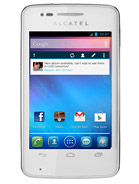
Alcatel One Touch S'Pop - user opinions and reviews
- Anonymous
you cant change the message notfication, even if theres option. still end up with the default (doorbell)
- Reply
- 2013-06-14 13:09
- 9Lay
- U
- Eleiz
Go to Settings > Language&Input > Tap on icon next beside TouchPal Input > General Settings > Keypress Vibration > and swipe slider to leftmost
- Reply
- 2013-06-13 14:57
- t7V}
- R


Login with
Facebook
Google
Sign up
