ADVERTISEMENT
O2 XDA II mini
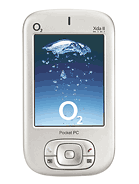
Produced by HTC. Functionally identical to Qtek S100, i-mate JAM and T-Mobile MDA Compact.
| Network | Technology | GSM |
|---|---|---|
| 2G bands | GSM 900 / 1800 / 1900 | |
| GPRS | Class 10 | |
| EDGE | No |
| Launch | Announced | 2004, Q4 |
|---|---|---|
| Status | Discontinued |
| Body | Dimensions | 108 x 58 x 18 mm (4.25 x 2.28 x 0.71 in) |
|---|---|---|
| Weight | 150 g (5.29 oz) | |
| SIM | Mini-SIM |
| Display | Type | TFT resistive touchscreen, 65K colors |
|---|---|---|
| Size | 2.8 inches, 42 x 57 mm, 24.3 cm2 (~38.8% screen-to-body ratio) | |
| Resolution | 240 x 320 pixels, 4:3 ratio (~143 ppi density) | |
| Handwriting recognition |
| Platform | OS | Microsoft Windows Mobile 2003 SE PocketPC |
|---|---|---|
| CPU | Intel PXA272 416 MHz |
| Memory | Card slot | MMC/SDIO |
|---|---|---|
| Internal | 64MB RAM, 64MB ROM |
| Main Camera | Single | 1.3 MP |
|---|---|---|
| Video | Yes |
| Selfie camera | No |
|---|
| Sound | Loudspeaker | Yes |
|---|---|---|
| Alert types | Vibration; Downloadable polyphonic ringtones | |
| 3.5mm jack | No |
| Comms | WLAN | No |
|---|---|---|
| Bluetooth | Yes | |
| Positioning | No | |
| Infrared port | Yes | |
| Radio | No | |
| USB | Proprietary |
| Features | Sensors | |
|---|---|---|
| Browser | WAP 2.0/xHTML, HTML (PocketIE) | |
| Pocket Office Voice memo MP3/AAC player |
| Battery | Type | Removable Li-Ion 1200 mAh battery |
|---|---|---|
| Stand-by | Up to 180 h | |
| Talk time | Up to 5 h |
| Misc | Colors | Stylish black, silver |
|---|
Disclaimer. We can not guarantee that the information on this page is 100% correct. Read more
O2 XDA II mini - user opinions and reviews
f
- foue boris
- ftI
i have one problem with my phone is in deuschland and in do not understand deuschland please would you help me
ADVERTISEMENT

Tip us
1.7m 126k
RSS
EV
Merch
Log in I forgot my password Sign up