First look
Sony Xperia Z preview: First look
This article is outdated. We have already published a full review.
13 MP camera with lots of bells and whistles
The Sony Xperia Z is equipped with a 13 megapixel camera that can produce still shots with a maximum resolution of 4128 x 3096 pixels. However, if you use the default Superior auto mode, you get 12 MP 4000 x 3000 shots instead.
The difference between the Superior auto mode and regular mode with all settings set to auto is that the first tries to guess what kind of scene you are trying to capture and adjusts all image parameters accordingly. This includes color saturation, contrast, metering mode and what not. The regular auto mode only sets the exposure automatically, but lets you fiddle with the other settings if you prefer.
The good news is the Superior auto mode also tells you what it guessed so you can easily intervene if it gets it wrong. From what our experience so far shows, though, it gets things right almost every time, so unless you are a photography enthusiast or just have to have that extra megapixel of resolution, you're probably better off sticking to Superior auto.
The camera interface consists of two panes. The right one holds four virtual buttons - a shortcut to the gallery, video and still shot shutter keys, and a primary/secondary camera toggle. On the left you get the shooting mode selection key in the top corner, followed by three customizable shortcuts. The final shortcut here opens the drawer with all available settings for the given shooting mode.

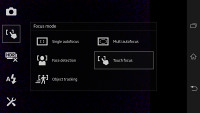
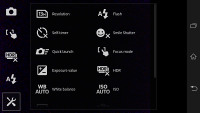
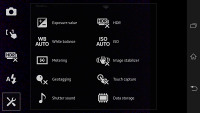
Sony Xperia Z camera interface
Naturally, the Sony Xperia Z camera offers all kinds of features, including face detection, smile shutter, geo-tagging, touch capture and HDR mode. There's also the home-baked quick launch mode, which lets you select what the camera shortcut on the lockscreen does.
You can go for simply launching the camera in either still or movie mode, or you can set it to immediately snap a photo/start capturing video. This might come in handy for those occasions when you are worried that you might miss a shot, but is also useful for when you don't want to waste your battery keeping the camera interface constantly going (it's a real battery hog).





Sony Xperia Z camera samples
1080p video recording with HDR
The Sony Xperia Z is capable of capturing 1080p video footage at 30fps, which is on par with most modern day smartphones. However, as a nice extra touch the smartphone also offers HDR for video capture, making it only the second one to do so after the Oppo Find 5.
What came as a disappointment for us is the fact that even though the Xperia Z is able to capture still shots while recording video, it only produces images with 1 megapixel of resolution. That's less than half the resolution of the individual frames in the video itself and not really good for much. Given that last year's flagships could capture full res stills during video recording, what the Xperia Z offers is inexcusably poor.
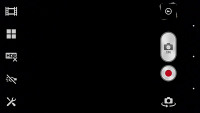
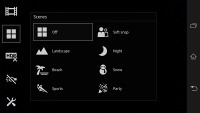
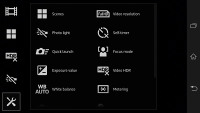
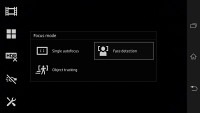
Camcorder interface
That's a minor thing however and what's important is the Xperia Z does the major things right. Videos come up with excellent detail and a solid 30fps framerate. Their bitrate hovers about the 16MBps mark, which is a decent compromise between quality and file size.
The quality of the videos is good with a decent, if unspectacular amount of fine detail and decent colors. We'll be able to tell more about that when the review is complete and we've done more shooting with the smartphone.


Tip us
2.1m 180k
RSS
EV
Merch
Log in I forgot my password Sign up