Asus ROG Phone 7 Ultimate review
Synthetic benchmarks
Having the latest and greatest chipset around is already expected of ROG Phones as they aim to constantly be at the top of the mobile gaming scene. This year is no exception, with the ROG Phone 7 and 7 Ultimate both rocking the Qualcomm Snapdragon 8 Gen 2 chip.
Asus sources the most tricked-out versions of the current top-tier chipsets. Since its competitors have access to the same hardware, they also enhance the experience in other supplementary ways. Things like advanced cooling solutions, in-depth performance tuning, and user-accessible profiles and parameters to tweak. The ROG Phone 7 Ultimate is no exception.
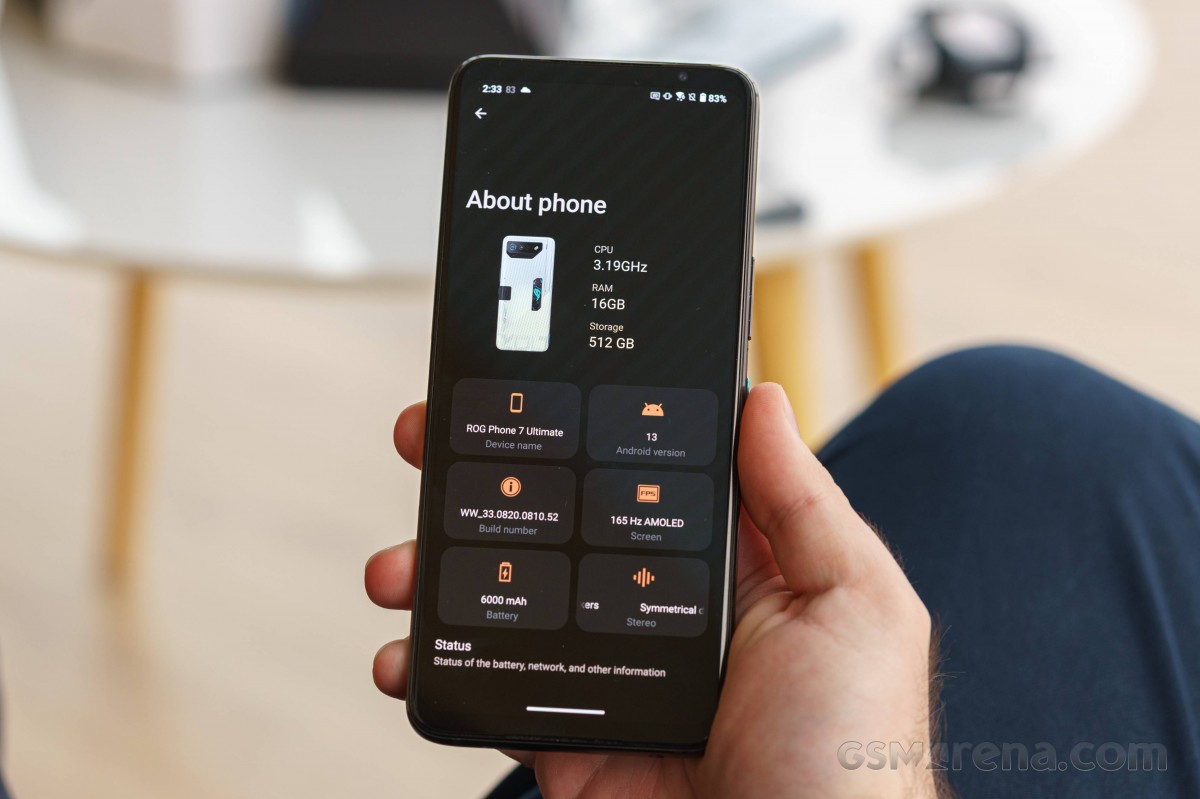
The Snapdragon 8 Gen 2 is an excellent 4nm chip made on TSMCs N4 node. Its CPU configuration includes one Kryo Prime, Cortex-X3 core, clocked at up to 3.2GHz, two Kryo Gold Cortex-A715 cores, working at up to 2.8GHz, two Kryo Gold Cortex-A710 cores at up to 2.8GHz and three Krio Silver Cortex-A510 cores, clocked at up to 2.0 GHz. The CPU is paired with an Adreno 740 GPU, which Asus says is overclocked, though it does not share any particulars.
This year Asus also went for the fastest currently-available LPDDR5X RAM, capable of up to 8533 Mbps of operation speeds, which is up to a 33% increase in performance since last gen.
For storage, all storage tiers of the ROG Phone 7 and 7 Ultimate get blazing-fast UFS 4.0 storage chips. These have a maximum bandwidth of 4324 Mbps and are twice as fast as the UFS 3.x generation.
For the sake of thoroughness, we will note that our ROG Phone 7 Ultimate review unit has 16GB of RAM and 512GB of storage, which is the only configuration the Ultimate comes in.
Another thing worth noting is that Asus has made its X-Mode performance tuning even smarter this generation. The system can now do advanced thread balancing so that things like a game's main thread always take priority and work on the best available core. Asus is also doing bespoke tuning on a per-game basis, with optimizations coming in as updates within Armory Crate. This tuning is reserved for the most popular titles and ensures performance stability while balancing heat and battery life for the best possible experience.
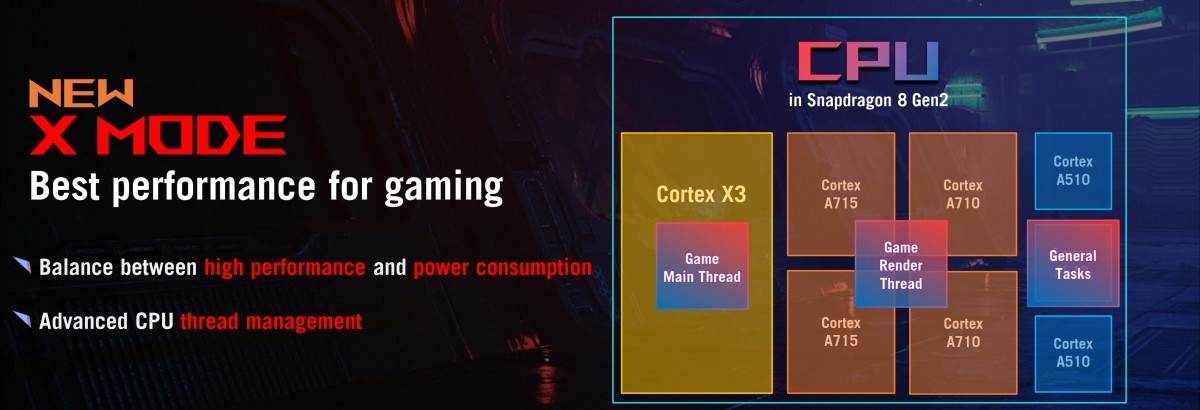
Asus estimates that the new Snapdragon 8 Gen 2 is about 15% better than the Snapdragon 8+ Gen 1 in CPU performance, 20% better in GPU and about 15% more efficient overall.
Another potentially interesting detail to note here is that, unlike previous years, Asus did not manage to get their hands on the best possible version of the Snapdragon 8 Gen 2 chipset available. That would be the Snapdragon 8 Gen 2 for Galaxy, which has its prime CPU core clocked higher at 3.36 GHz and its GPU boosted to 719 MHz.
We can only presume that this particular chip, as its name suggests, is exclusive to Samsung Galaxy devices, at least for the time being, which is why Asus did not source it for the ROG Phone 7 family. This being the case, it will be really interesting to see how the ROG Phone 7 Ultimate performs compared to current Galaxy phones like the Galaxy S23 Ultra.
Transitioning into some actual synthetic benchmarks, we ran all of our tests at the default Dynamic mode, X Mode, and X Mode+, which only gets unlocked and substitutes the regular X Mode when you attach the AeroActive Cooler 7 to the ROG Phone 7 Ultimate. We've left all of the other in-depth tuning sliders on default, cooled the phone between runs and had the AeroActive Cooler 5 manually set to max for those tests.
Let's kick things off with some CPU testing and GeekBench. We can see that the Snapdragon 8 Gen 2 for Galaxy platform is outpacing the vanilla Snapdragon 8 Gen 2 a bit in single-core tests due to its higher prime core clock speed. Not so much with multi-core workloads.
GeekBench 5 (multi-core)
Higher is better
-
iPhone 14 Pro Max
5423 -
ZTE nubia Red Magic 8 Pro
5211 -
ROG Phone 7 Ultimate (X Mode)
5180 -
ROG Phone 7 Ultimate (X Mode+)
5139 -
ROG Phone 7 (X Mode+)
5098 -
Xiaomi 13 Pro
5087 -
Galaxy S23+
5073 -
ROG Phone 7
4935 -
Galaxy S23 Ultra
4927 -
OnePlus 11
4899 -
Motorola Edge 40 Pro
4896 -
ROG Phone 7 Ultimate
4832 -
iQOO 11
4803 -
ROG Phone 6D (X Mode+)
4631 -
iPhone 14 Plus
4582 -
ROG Phone 6D Ultimate (X Mode+)
4575 -
Xiaomi 12S Ultra
4300 -
vivo X90 Pro
4273 -
Motorola Edge 30 Ultra
4265 -
ROG Phone 6 Pro (X Mode+)
3980 -
Huawei Mate 50 Pro
3839 -
Black Shark 5 Pro
3665 -
Motorola Edge 30 Pro
3658 -
ROG Phone 6D
3531 -
ROG Phone 6D Ultimate
3505 -
Oppo Find X5 Pro
3433 -
Sony Xperia 1 IV
3403 -
Google Pixel 7 Pro
3187 -
ROG Phone 6 Pro
2659
GeekBench 5 (single-core)
Higher is better
-
iPhone 14 Pro Max
1890 -
iPhone 14 Plus
1712 -
Galaxy S23+
1551 -
Galaxy S23 Ultra
1537 -
Xiaomi 13 Pro
1490 -
ZTE nubia Red Magic 8 Pro
1486 -
Motorola Edge 40 Pro
1482 -
iQOO 11
1479 -
ROG Phone 7 Ultimate (X Mode)
1473 -
ROG Phone 7 (X Mode+)
1471 -
ROG Phone 7 Ultimate (X Mode+)
1454 -
ROG Phone 6D (X Mode+)
1399 -
ROG Phone 7
1397 -
vivo X90 Pro
1387 -
ROG Phone 6D Ultimate (X Mode+)
1360 -
ROG Phone 7 Ultimate
1359 -
ROG Phone 6 Pro (X Mode+)
1329 -
Xiaomi 12S Ultra
1324 -
Huawei Mate 50 Pro
1277 -
Motorola Edge 30 Ultra
1276 -
Motorola Edge 30 Pro
1196 -
Black Shark 5 Pro
1176 -
Sony Xperia 1 IV
1160 -
OnePlus 11
1150 -
ROG Phone 6 Pro
1110 -
Google Pixel 7 Pro
1056 -
ROG Phone 6D
1015 -
Oppo Find X5 Pro
1002 -
ROG Phone 6D Ultimate
1001
AnTuTu is a much more compound benchmark, and things like the ROG Phone 7 Ultimate's LPDDR5X RAM and UFS 4.0 storage are definitely showing through in the chart-topping results.
AnTuTu 9
Higher is better
-
ROG Phone 7 (X Mode+)
1333597 -
ROG Phone 7 Ultimate (X Mode+)
1325105 -
ROG Phone 7 Ultimate (X Mode)
1310055 -
ZTE nubia Red Magic 8 Pro
1288866 -
Xiaomi 13 Pro
1281666 -
iQOO 11
1281665 -
ROG Phone 7
1279196 -
Motorola Edge 40 Pro
1273764 -
Galaxy S23 Ultra
1241531 -
Galaxy S23+
1234077 -
vivo X90 Pro
1228735 -
ROG Phone 7 Ultimate
1218533 -
OnePlus 11
1140661 -
ROG Phone 6D Ultimate (X Mode+)
1107464 -
ROG Phone 6D (X Mode+)
1104042 -
ROG Phone 6 Pro (X Mode+)
1103188 -
Motorola Edge 30 Ultra
1074722 -
Xiaomi 12S Ultra
1039412 -
Oppo Find X5 Pro
1012896 -
Black Shark 5 Pro
1007133 -
Huawei Mate 50 Pro
979921 -
iPhone 14 Pro Max
955884 -
ROG Phone 6D
948594 -
Motorola Edge 30 Pro
941895 -
ROG Phone 6D Ultimate
931170 -
Sony Xperia 1 IV
838832 -
iPhone 14 Plus
797976 -
Google Pixel 7 Pro
796369 -
ROG Phone 6 Pro
762090
Moving on to graphical tests and GFXBench, we can clearly see that the Snapdragon 8 Gen 2 and the ROG Phone 7 Ultimate are on top of the food chain.
GFX Aztek ES 3.1 High (onscreen)
Higher is better
-
Galaxy S23+
89 -
Motorola Edge 40 Pro
86 -
ROG Phone 7 (X Mode+)
84 -
ROG Phone 7 Ultimate
83 -
ROG Phone 7 Ultimate (X Mode)
83 -
ROG Phone 7 Ultimate (X Mode+)
83 -
ROG Phone 7
81 -
ZTE nubia Red Magic 8 Pro
75 -
vivo X90 Pro
65 -
Motorola Edge 30 Ultra
65 -
ROG Phone 6D Ultimate (X Mode+)
63 -
ROG Phone 6D (X Mode+)
62 -
ROG Phone 6D
61 -
ROG Phone 6 Pro (X Mode+)
61 -
Black Shark 5 Pro
61 -
ROG Phone 6D Ultimate
59 -
Motorola Edge 30 Pro
59 -
ROG Phone 6 Pro
58 -
iQOO 11
54 -
Galaxy S23 Ultra
54 -
Huawei Mate 50 Pro
52 -
Xiaomi 13 Pro
49 -
OnePlus 11
49 -
Sony Xperia 1 IV
43 -
Xiaomi 12S Ultra
38 -
Oppo Find X5 Pro
35 -
Google Pixel 7 Pro
26
GFX Aztek ES 3.1 High (offscreen 1440p)
Higher is better
-
ROG Phone 7 Ultimate (X Mode)
62 -
ROG Phone 7 Ultimate (X Mode+)
62 -
ROG Phone 7 (X Mode+)
62 -
iQOO 11
62 -
Galaxy S23+
62 -
ZTE nubia Red Magic 8 Pro
61 -
Xiaomi 13 Pro
61 -
OnePlus 11
61 -
Motorola Edge 40 Pro
60 -
Galaxy S23 Ultra
59 -
ROG Phone 7 Ultimate
56 -
vivo X90 Pro
55 -
ROG Phone 7
52 -
ROG Phone 6 Pro (X Mode+)
46 -
Xiaomi 12S Ultra
46 -
ROG Phone 6D (X Mode+)
45 -
ROG Phone 6D Ultimate (X Mode+)
45 -
Huawei Mate 50 Pro
45 -
ROG Phone 6D
43 -
ROG Phone 6D Ultimate
43 -
Motorola Edge 30 Ultra
43 -
Black Shark 5 Pro
41 -
Oppo Find X5 Pro
40 -
Motorola Edge 30 Pro
39 -
ROG Phone 6 Pro
37 -
Google Pixel 7 Pro
29 -
Sony Xperia 1 IV
26
GFX Aztek Vulkan High (onscreen)
Higher is better
-
Motorola Edge 40 Pro
98 -
Galaxy S23+
93 -
ROG Phone 7 Ultimate (X Mode)
86 -
ROG Phone 7 Ultimate (X Mode+)
86 -
ROG Phone 7 (X Mode+)
86 -
ZTE nubia Red Magic 8 Pro
79 -
ROG Phone 7 Ultimate
78 -
ROG Phone 7
74 -
vivo X90 Pro
68 -
ROG Phone 6 Pro (X Mode+)
66 -
ROG Phone 6D
64 -
ROG Phone 6D (X Mode+)
64 -
ROG Phone 6D Ultimate (X Mode+)
64 -
ROG Phone 6D Ultimate
63 -
Motorola Edge 30 Ultra
62 -
Black Shark 5 Pro
61 -
Galaxy S23 Ultra
60 -
Motorola Edge 30 Pro
60 -
ROG Phone 6 Pro
56 -
iQOO 11
55 -
Huawei Mate 50 Pro
55 -
iPhone 14 Pro Max
54 -
OnePlus 11
53 -
Xiaomi 13 Pro
52 -
iPhone 14 Plus
51 -
Xiaomi 12S Ultra
39 -
Oppo Find X5 Pro
36 -
Sony Xperia 1 IV
31 -
Google Pixel 7 Pro
25
GFX Aztek Vulkan High (offscreen 1440p)
Higher is better
-
ROG Phone 7 Ultimate (X Mode)
69 -
ROG Phone 7 Ultimate (X Mode+)
69 -
ROG Phone 7 (X Mode+)
69 -
iQOO 11
69 -
Galaxy S23 Ultra
69 -
Galaxy S23+
69 -
ZTE nubia Red Magic 8 Pro
68 -
OnePlus 11
68 -
Motorola Edge 40 Pro
68 -
Xiaomi 13 Pro
67 -
ROG Phone 7 Ultimate
58 -
ROG Phone 7
55 -
vivo X90 Pro
54 -
iPhone 14 Pro Max
52 -
ROG Phone 6 Pro (X Mode+)
51 -
Xiaomi 12S Ultra
51 -
Huawei Mate 50 Pro
51 -
ROG Phone 6D Ultimate (X Mode+)
49 -
ROG Phone 6D (X Mode+)
48 -
ROG Phone 6D
46 -
Motorola Edge 30 Pro
45 -
ROG Phone 6D Ultimate
44 -
Oppo Find X5 Pro
44 -
Black Shark 5 Pro
44 -
Motorola Edge 30 Ultra
43 -
iPhone 14 Plus
40 -
ROG Phone 6 Pro
38 -
Google Pixel 7 Pro
30 -
Sony Xperia 1 IV
26
We can clearly see the bump in clock speed on the Adreno 740 GPU inside the Snapdragon 8 Gen 2 for Galaxy platform working in its favor. The small but noticeable performance increase shows through both on-screen and off-screen tests. Other than that, however, the ROG Phone 7 Ultimate is leading the performance charts.
GFX Car Chase ES 3.1 (onscreen)
Higher is better
-
Motorola Edge 40 Pro
112 -
Galaxy S23+
110 -
ROG Phone 7 (X Mode+)
108 -
ROG Phone 7 Ultimate
107 -
ROG Phone 7 Ultimate (X Mode)
107 -
ROG Phone 7 Ultimate (X Mode+)
107 -
ROG Phone 7
107 -
ZTE nubia Red Magic 8 Pro
97 -
Black Shark 5 Pro
82 -
ROG Phone 6 Pro
79 -
ROG Phone 6 Pro (X Mode+)
79 -
Motorola Edge 30 Pro
78 -
ROG Phone 6D (X Mode+)
76 -
vivo X90 Pro
74 -
Sony Xperia 1 IV
74 -
Motorola Edge 30 Ultra
73 -
ROG Phone 6D Ultimate
72 -
ROG Phone 6D Ultimate (X Mode+)
72 -
ROG Phone 6D
71 -
Huawei Mate 50 Pro
68 -
iQOO 11
67 -
Galaxy S23 Ultra
67 -
Xiaomi 13 Pro
64 -
iPhone 14 Plus
60 -
OnePlus 11
57 -
iPhone 14 Pro Max
54 -
Xiaomi 12S Ultra
51 -
Oppo Find X5 Pro
44 -
Google Pixel 7 Pro
34
GFX Car Chase ES 3.1 (offscreen 1080p)
Higher is better
-
Galaxy S23+
130 -
ROG Phone 7 (X Mode+)
129 -
ROG Phone 7 Ultimate (X Mode)
128 -
ROG Phone 7 Ultimate (X Mode+)
128 -
iQOO 11
128 -
ROG Phone 7 Ultimate
127 -
ZTE nubia Red Magic 8 Pro
127 -
Xiaomi 13 Pro
127 -
Motorola Edge 40 Pro
127 -
Galaxy S23 Ultra
126 -
OnePlus 11
126 -
ROG Phone 7
125 -
iPhone 14 Pro Max
118 -
vivo X90 Pro
105 -
Xiaomi 12S Ultra
104 -
ROG Phone 6 Pro
102 -
ROG Phone 6 Pro (X Mode+)
102 -
Huawei Mate 50 Pro
101 -
iPhone 14 Plus
99 -
Black Shark 5 Pro
96 -
Motorola Edge 30 Pro
95 -
Oppo Find X5 Pro
94 -
Motorola Edge 30 Ultra
93 -
ROG Phone 6D (X Mode+)
90 -
ROG Phone 6D Ultimate (X Mode+)
89 -
ROG Phone 6D
84 -
ROG Phone 6D Ultimate
82 -
Sony Xperia 1 IV
79 -
Google Pixel 7 Pro
63
The Manhattan OpenGL ES 3.1 and 3.0 tests really take advantage of the extra headroom the 165Hz maximum refresh rate of the ROG Phone 7 Ultimate affords. We can even see the latter test bumping up against the display's refresh rate cap, which is kind of ludicrous to think about. Mobile performance has come so far.
GFX Manhattan ES 3.1 (onscreen)
Higher is better
-
Motorola Edge 40 Pro
164 -
ROG Phone 7 Ultimate (X Mode+)
163 -
ROG Phone 7 (X Mode+)
163 -
ROG Phone 7 Ultimate
162 -
ROG Phone 7 Ultimate (X Mode)
162 -
ROG Phone 7
157 -
ROG Phone 6 Pro (X Mode+)
140 -
ROG Phone 6 Pro
126 -
ROG Phone 6D Ultimate (X Mode+)
124 -
ROG Phone 6D (X Mode+)
123 -
ROG Phone 6D
122 -
ROG Phone 6D Ultimate
122 -
ZTE nubia Red Magic 8 Pro
121 -
Galaxy S23+
120 -
Black Shark 5 Pro
120 -
vivo X90 Pro
118 -
Huawei Mate 50 Pro
113 -
iQOO 11
112 -
Galaxy S23 Ultra
112 -
Motorola Edge 30 Pro
111 -
Xiaomi 13 Pro
103 -
Motorola Edge 30 Ultra
97 -
Xiaomi 12S Ultra
91 -
Sony Xperia 1 IV
72 -
OnePlus 11
60 -
iPhone 14 Pro Max
60 -
iPhone 14 Plus
60 -
Google Pixel 7 Pro
57
GFX Manhattan ES 3.1 (offscreen 1080p)
Higher is better
-
Galaxy S23+
224 -
ROG Phone 7 (X Mode+)
223 -
ROG Phone 7 Ultimate (X Mode+)
222 -
Xiaomi 13 Pro
222 -
iQOO 11
222 -
ROG Phone 7 Ultimate (X Mode)
221 -
OnePlus 11
220 -
Motorola Edge 40 Pro
220 -
ZTE nubia Red Magic 8 Pro
219 -
ROG Phone 7 Ultimate
214 -
Galaxy S23 Ultra
212 -
vivo X90 Pro
200 -
ROG Phone 7
194 -
iPhone 14 Pro Max
192 -
Xiaomi 12S Ultra
182 -
ROG Phone 6 Pro (X Mode+)
180 -
Huawei Mate 50 Pro
178 -
iPhone 14 Plus
176 -
ROG Phone 6D (X Mode+)
172 -
Black Shark 5 Pro
167 -
ROG Phone 6D Ultimate (X Mode+)
164 -
Oppo Find X5 Pro
162 -
Motorola Edge 30 Pro
160 -
ROG Phone 6D
152 -
ROG Phone 6D Ultimate
137 -
ROG Phone 6 Pro
134 -
Sony Xperia 1 IV
126 -
Motorola Edge 30 Ultra
121 -
Google Pixel 7 Pro
108
GFX Manhattan ES 3.0 (onscreen)
Higher is better
-
ROG Phone 7 Ultimate
166 -
ROG Phone 7 Ultimate (X Mode)
166 -
ROG Phone 7 Ultimate (X Mode+)
166 -
ROG Phone 7 (X Mode+)
166 -
Motorola Edge 40 Pro
166 -
ROG Phone 7
165 -
ROG Phone 6 Pro (X Mode+)
161 -
ROG Phone 6 Pro
149 -
Motorola Edge 30 Pro
142 -
ROG Phone 6D
131 -
ROG Phone 6D Ultimate (X Mode+)
131 -
ROG Phone 6D (X Mode+)
130 -
ROG Phone 6D Ultimate
129 -
ZTE nubia Red Magic 8 Pro
121 -
Xiaomi 13 Pro
121 -
iQOO 11
120 -
Galaxy S23+
120 -
vivo X90 Pro
120 -
Black Shark 5 Pro
120 -
Huawei Mate 50 Pro
120 -
Galaxy S23 Ultra
119 -
Xiaomi 12S Ultra
118 -
Google Pixel 7 Pro
103 -
Sony Xperia 1 IV
100 -
OnePlus 11
60 -
iPhone 14 Pro Max
60 -
iPhone 14 Plus
60
GFX Manhattan ES 3.0 (offscreen 1080p)
Higher is better
-
ROG Phone 7 Ultimate (X Mode+)
329 -
ROG Phone 7 (X Mode+)
329 -
ZTE nubia Red Magic 8 Pro
328 -
ROG Phone 7 Ultimate (X Mode)
327 -
OnePlus 11
327 -
Xiaomi 13 Pro
326 -
Motorola Edge 40 Pro
322 -
iQOO 11
321 -
Galaxy S23+
319 -
Galaxy S23 Ultra
311 -
ROG Phone 7 Ultimate
290 -
vivo X90 Pro
287 -
Xiaomi 12S Ultra
268 -
Huawei Mate 50 Pro
264 -
ROG Phone 6 Pro (X Mode+)
263 -
iPhone 14 Pro Max
262 -
ROG Phone 7
261 -
Motorola Edge 30 Pro
251 -
ROG Phone 6D (X Mode+)
244 -
Oppo Find X5 Pro
244 -
Black Shark 5 Pro
241 -
iPhone 14 Plus
234 -
ROG Phone 6D Ultimate (X Mode+)
230 -
ROG Phone 6D
210 -
ROG Phone 6 Pro
204 -
Sony Xperia 1 IV
186 -
ROG Phone 6D Ultimate
178 -
Motorola Edge 30 Ultra
178 -
Google Pixel 7 Pro
170
Finally, we have 3DMark. Again, we can see the small advantage of the Snapdragon 8 Gen 2 for Galaxy mobile platform, but other than that, the ROG Phone 7 Ultimate is again leading the pack with top-notch graphical performance.
3DMark Wild Life Extreme (offscreen 1440p)
Higher is better
-
Galaxy S23+
3830 -
Galaxy S23 Ultra
3790 -
ROG Phone 7 (X Mode+)
3770 -
ROG Phone 7 Ultimate (X Mode+)
3757 -
ROG Phone 7 Ultimate (X Mode)
3751 -
ROG Phone 7
3745 -
vivo X90 Pro
3698 -
Motorola Edge 40 Pro
3660 -
ROG Phone 7 Ultimate
3656 -
ZTE nubia Red Magic 8 Pro
3643 -
OnePlus 11
3594 -
iQOO 11
3514 -
iPhone 14 Pro Max
3341 -
Xiaomi 13 Pro
2939 -
ROG Phone 6 Pro (X Mode+)
2815 -
Huawei Mate 50 Pro
2753 -
ROG Phone 6D Ultimate (X Mode+)
2668 -
ROG Phone 6D (X Mode+)
2622 -
ROG Phone 6 Pro
2611 -
ROG Phone 6D Ultimate
2599 -
ROG Phone 6D
2555 -
iPhone 14 Plus
2480 -
Google Pixel 7 Pro
1835
Thermal-throttling behavior
The closest we can get to lengthy load testing on a mobile device is running "torture" burnout tests and monitoring thermal-throttling and performance over time. Naturally, we couldn't skip doing that for the ROG Phone 7 Ultimate in all three of its performance profiles.
Let's start with the basic Dynamic mode (X Mode off). Here we can see the ROG Phone 7 Ultimate takes on heat and gradually reacts to its buildup. That's generally what you want to see in terms of thermal behavior - a gradual, steady decline with no sudden and jarring drops that could cause stuttering in game.
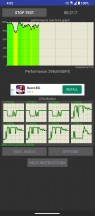
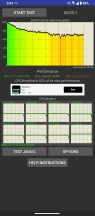
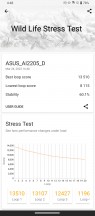
Thermal-throttling in Dynamic mode
The drop-down in performance by the end of the test is definitely not insignificant. But even in this cut-down state, the Snapdragon 8 Gen 2 has plenty of power to throw around and can easily handle even heavy gaming loads.
You are meant to game in X Mode, which Asus makes clear as day by even automatically enabling X Mode once you start practically any game and even most benchmarks. In this mode, performance loss over time is much less. The phone's surface gets very toasty and even unpleasant to touch after around 20 minutes of sustained load. Particularly the middle metal frame. But that's the price that needs to be paid for passively keeping the internals as cool as possible.
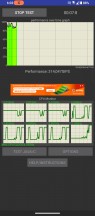
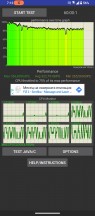
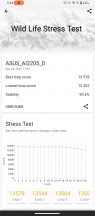
Thermal-throttling in X Mode
Of course, there is the massive "party trick" the ROG Phone 7/7 Ultimate has in the form of the optional AeroActive Cooler accessory. While the cooler has always been a staple of the ROG Phone family, this year's model has an active peltier cooling element inside, just like last year's. The difference is immediately noticeable, particularly on the surface of the phone.
We ran this final throttling test with the AeroActive Cooler 7 set to the maximum "Frozen" setting, which blasts the peltier and the fan as hard as possible and even requires external power.
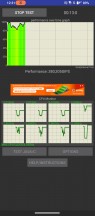
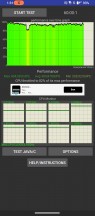
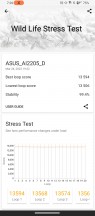
Thermal-throttling in X Mode+ with AeroActive cooler set to Frozen
The results were a phone that remained perfectly comfortable to hold even after an hour of torture and reasonable performance loss. Both are impressive achievements.
AeroActive Cooler 7
Asus' signature active cooling fan accessory for the ROG phone line has already gone through so many design iterations that it probably deserves an article of its own. Last year's AeroActive Cooler 6 saw what was arguably the biggest and most radical change to date with the introduction of an active peltier cooling element inside the gadget. Well, that's been carried forward to the AeroActive Cooler 7, along with most of the other elements of the cooler.
This year, however, the new addition to the mix is a rather beefy 5-magnet, 13*38mm subwoofer nestled inside the AeroActive Cooler 7. Added to the two front-firing speakers, it makes for an impressive 2.1 audio system. It also definitely contributes towards the overall beefy nature of the cooler.
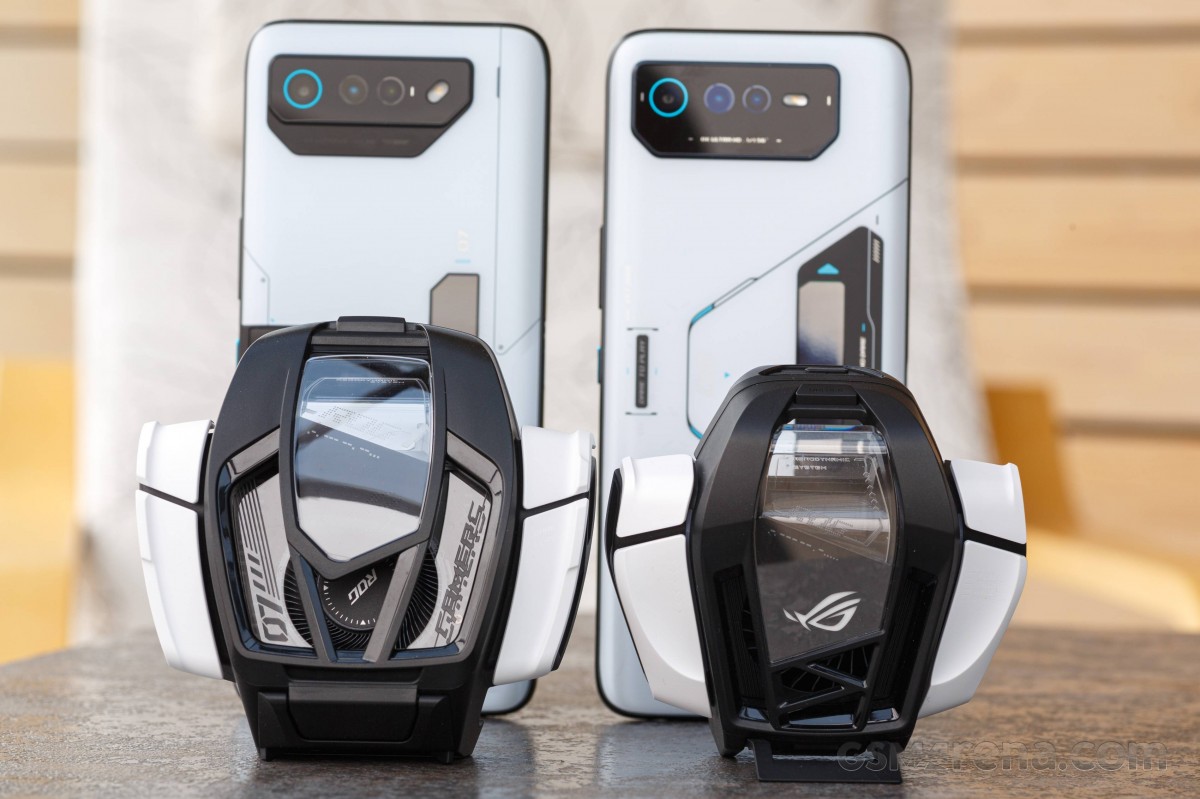 Left: AeroActive Cooler 7 * Right: AeroActive Cooler 6
The design is quite similar to last year's and is still very aggressive and "gamery" with bold, strong lines and geometric shapes. Unlike last year's model, the AeroActive Cooler 7 does not rely solely on a USB Type-C port. It still has one that plugs into the phone and passes through all of its features transparently (charging, HDMI out, etc.), but now there are also two POGO pins that connect to the phone. Perhaps those are solely to handle the subwoofer. We can't say for sure.
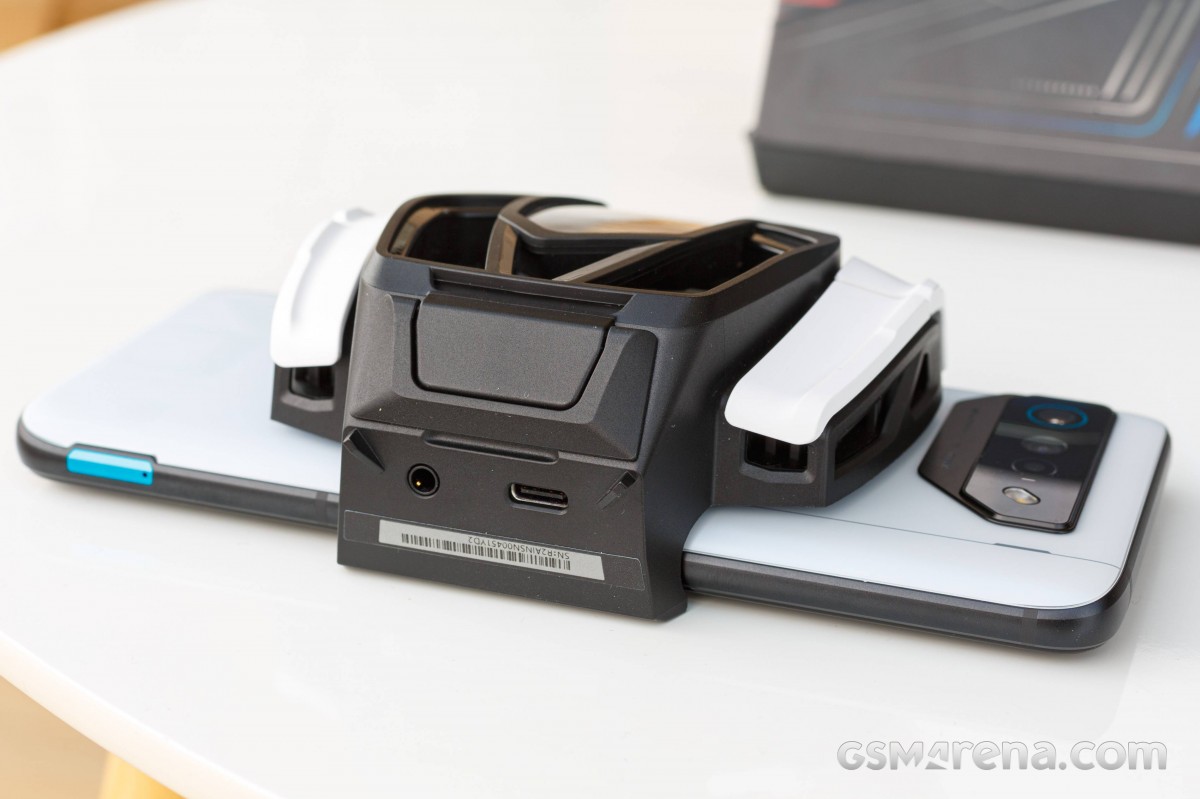
Unlike las year's model, this year, the AeroActive Cooler 7 has a 3.5mm audio jack, which is great to see.
Attachment of the AeroActive Cooler 7 is achieved via a spring-loaded latch mechanism that now has a button to release and a ratchet mechanism to close back up. The fit is very snug, and putting the cooler on and taking it off is very easy.
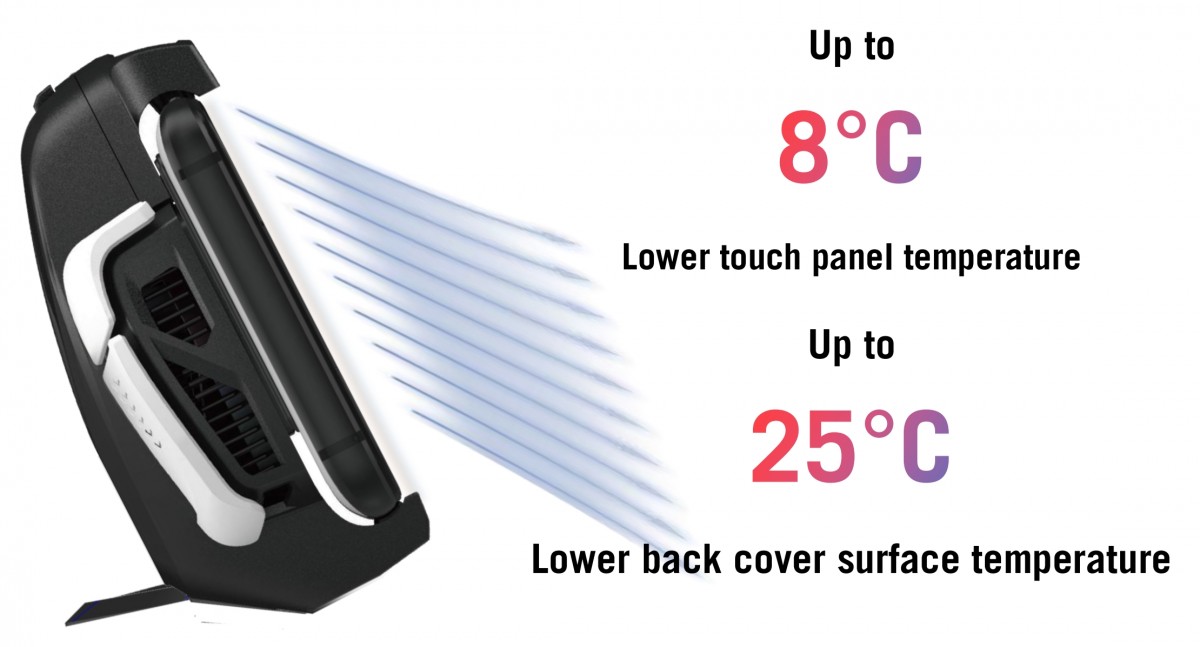
New this year is a secondary air duct built into the top latch of the AeroActive Cooler 7. That way, air can be directed to blow on the surface of the display, not just the back of the phone. Asus claims that this can reduce display surface temperature by up to 8 degrees while simultaneously lowering the backside surface temperature by a whopping 25 degrees.
In case you were wondering what happens to the power button once the AeroActive Cooler 7 goes on, Asus thought of that and have added a piece of flexible rubber to "extend" the button outward, making it still usable. A bumper case for the phone comes with the AeroActive Cooler 6 in the same box and is naturally compatible with it.
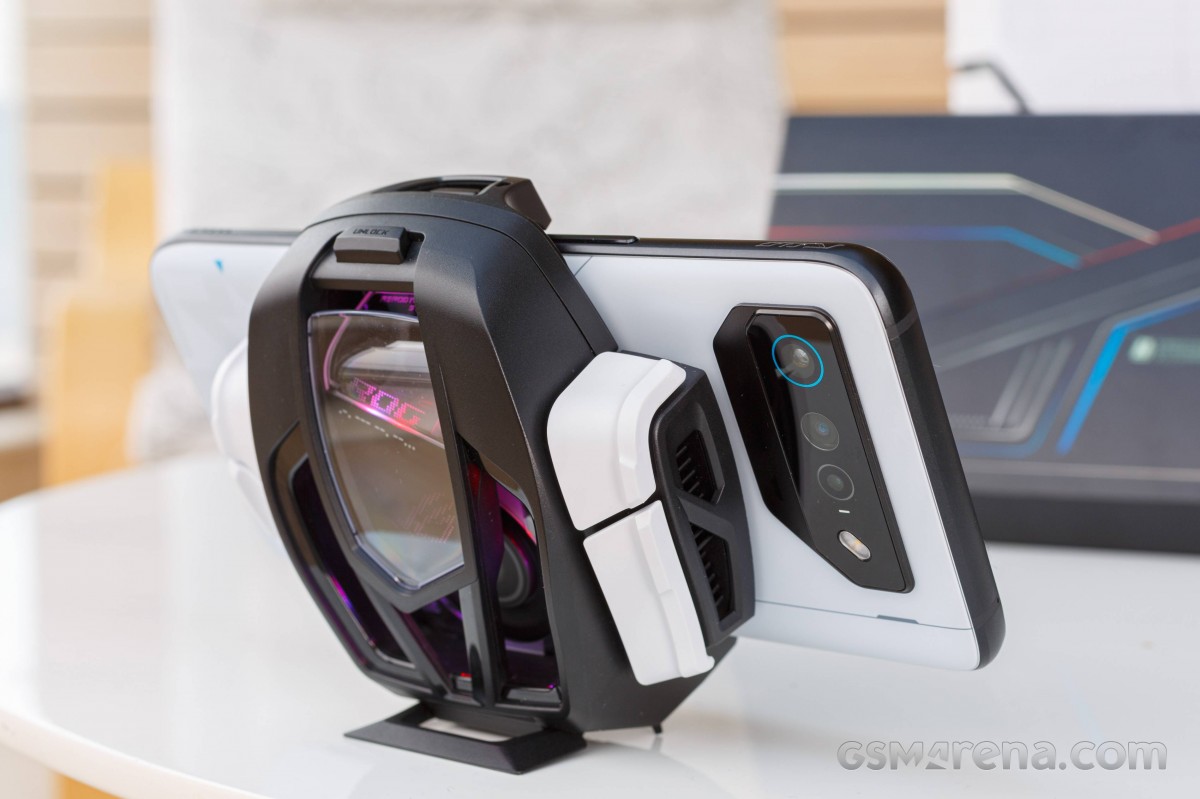
Continuing with other functional bits on the device, it has four physical, programmable AirTrigger buttons, just like the AeroActive Cooler 6. These feel great and are actually omnidirectional, which is great in practice. It means you can essentially press them in any spot you want and in any "direction," so to say.
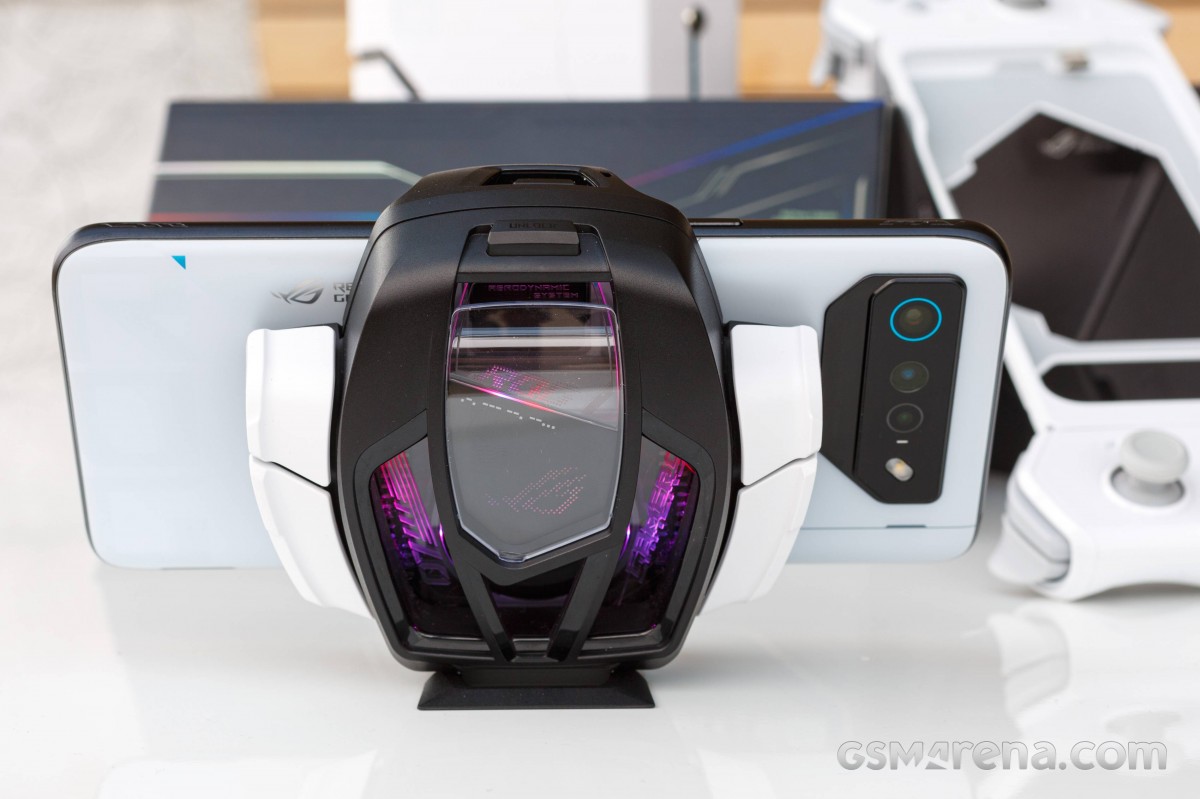
The AeroActive Cooler 7 has its own RGB lighting, which illuminates and shines through the middle transparent plastic bit. Once the accessory is on, this lighting will use the System lighting settings you already have dialed in for the RGB lights on the back of the phone. Or in the case of the ROG Phone 7 Ultimate, the Vision Display settings will replace the System lighting menu.
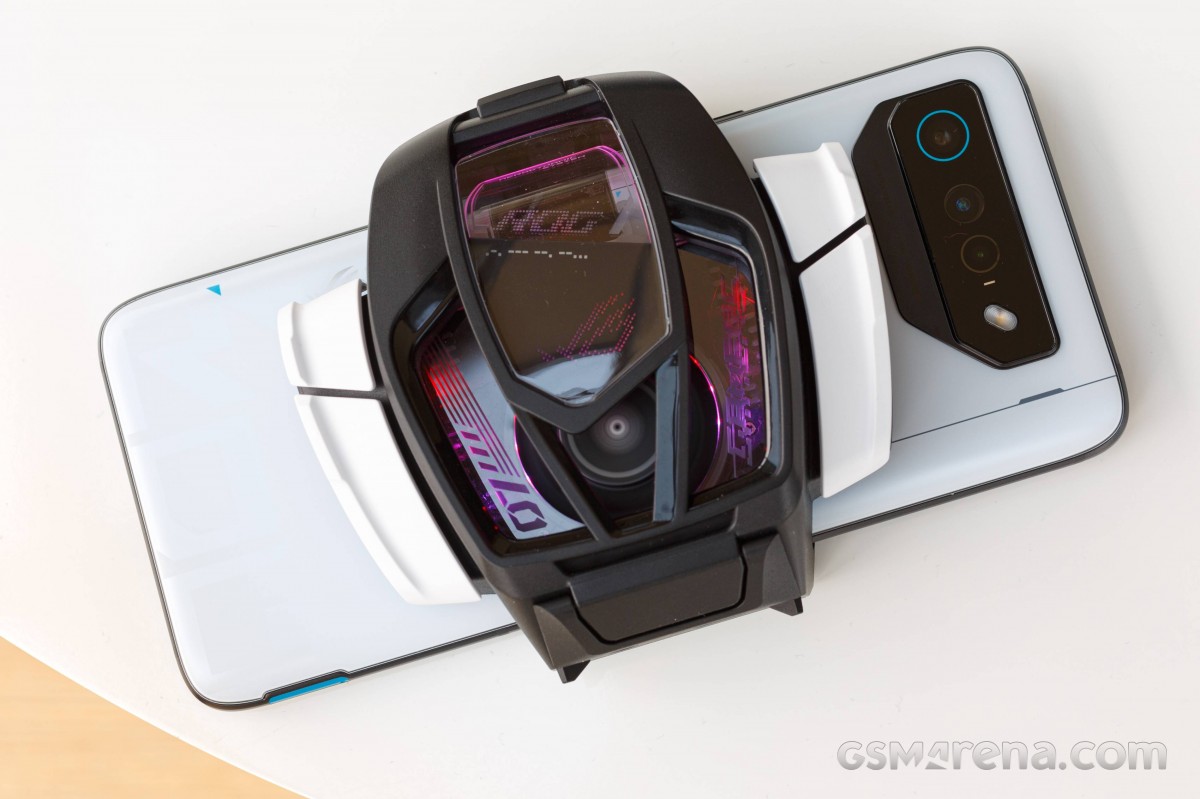
By the way, while this transparent plastic bit looks great while illuminated, we really don't like the plastic itself. It scratches really easily and just looks ugly once that inevitably happens. But that's nitpicking.
The last functional bit is an extendable kickstand. This time, it comes up from the bottom of the AeroActive Cooler and generally does a great job supporting the phone. Its angle is not adjustable or anything fancy like that. You just get one setting.
On to functionality, then. The basic principle of operation for the AeroActive Cooler 7 is easy to understand - the cooler sits on the back of the phone, covering its "hot spot" in the middle, where the centrally-mounted PCB resides. There is a thermally conductive pad on the outside part, a copper plate, some radiators, and a fan inside. Technically, the design is not meant to pull heat away from the back of the phone but rather actively cool it.
The "special sauce", just like last year, is the peltier element, sometimes called a TEC. It is a thermoelectric piece that takes a current and then uses that to make one of its sides cold and the other hot. So what is actually happening is that the AeroActive Cooler 7 is actively cooling down the back of the phone while the radiator and fan are actively cooling off and pulling heat off of the TEC's hot side.


AeroActive Cooler 7 settings
The AeroActive Cooler 7 actually has its own settings menu within Armoury Crate, which, among other things, lets the user choose between four modes of operation. Smart is a sort of auto that monitors thermals and decides how much to power the fan and the peltier. Cool mode just uses the fan to dissipate heat without turning on the peltier. Frosty and Frozen modes have both the fan and the peltier working. Frosty has the peltier working with a lower current. Basically, as much as the phone can provide via its Side port. The AeroActive Cooler 7 needs external power hooked up in its top Frozen mode.
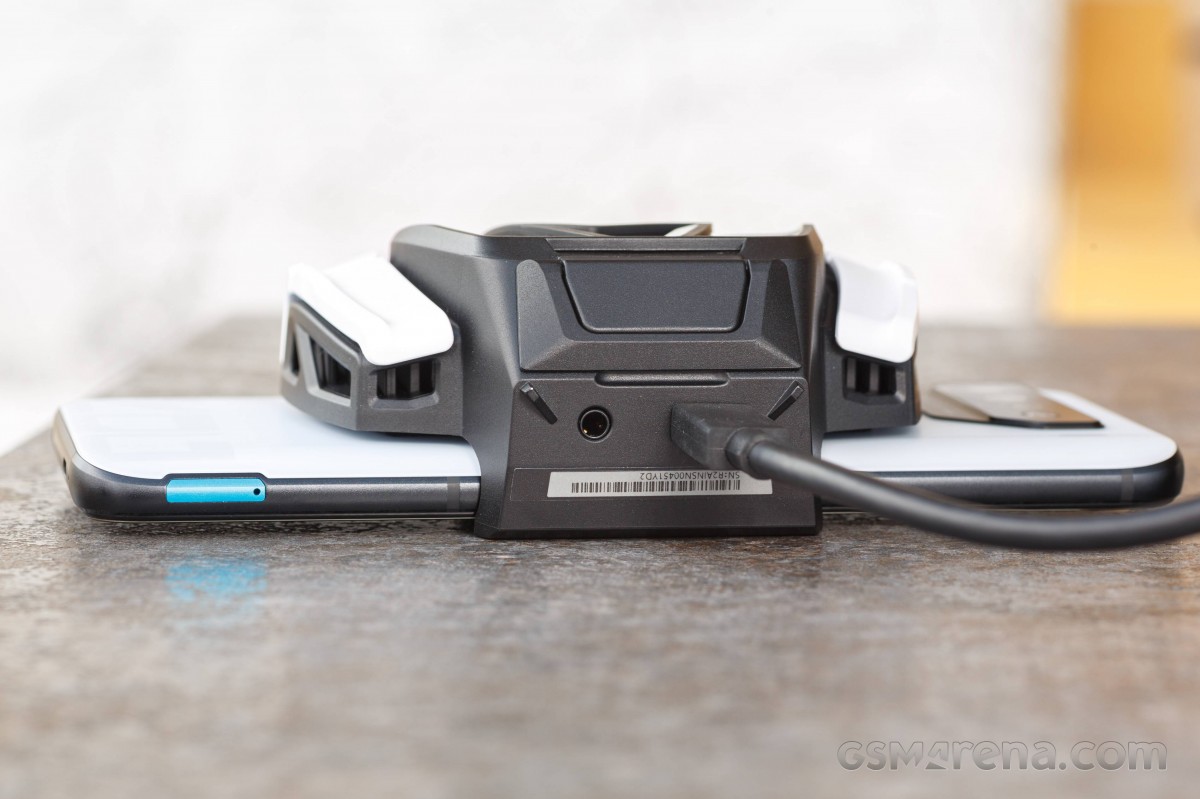
Finally, on the subject of noise, the AeroActive Cooler 7 is not particularly quiet. It is very much audible at any setting and can get particularly distracting in Frozen mode. Despite its big size, its fan is still relatively small, and there is simply no way around generating at least some noise. At least it can easily be drowned out by the excellent front-facing speakers and subwoofer combo. Still, don't expect anything akin to a stealthy and quiet gaming experience with the AeroActive Cooler 7 attached.


Tip us
2.1m 180k
RSS
EV
Merch
Log in I forgot my password Sign up