Google Maps update makes the app fully iPhone Duo compatible

The iPhone Duo has been shipping for a little while now, but plenty of iOS apps still haven't been adapted to its two displays. Google Maps is no longer one of them, as version 26.44.4 of the app is now being reported to add full support for the device.
Apple iPhone Duo
| 256GB 12GB RAM | £ 1,999.00 | € 2,299.00 |
| 512GB 12GB RAM | £ 2,199.00 | € 2,549.00 |
| Show all prices | ||
While Google's App Store release notes only mention "bug fixes", if you already use Google Maps on the iPhone Duo, you'll notice the difference right away. Previously, the app was slightly offset to the left on the outer screen to make room for the new iOS dock position. On the inner screen, you got the regular iPhone app, which could be moved to the left or right but left most of the display empty.
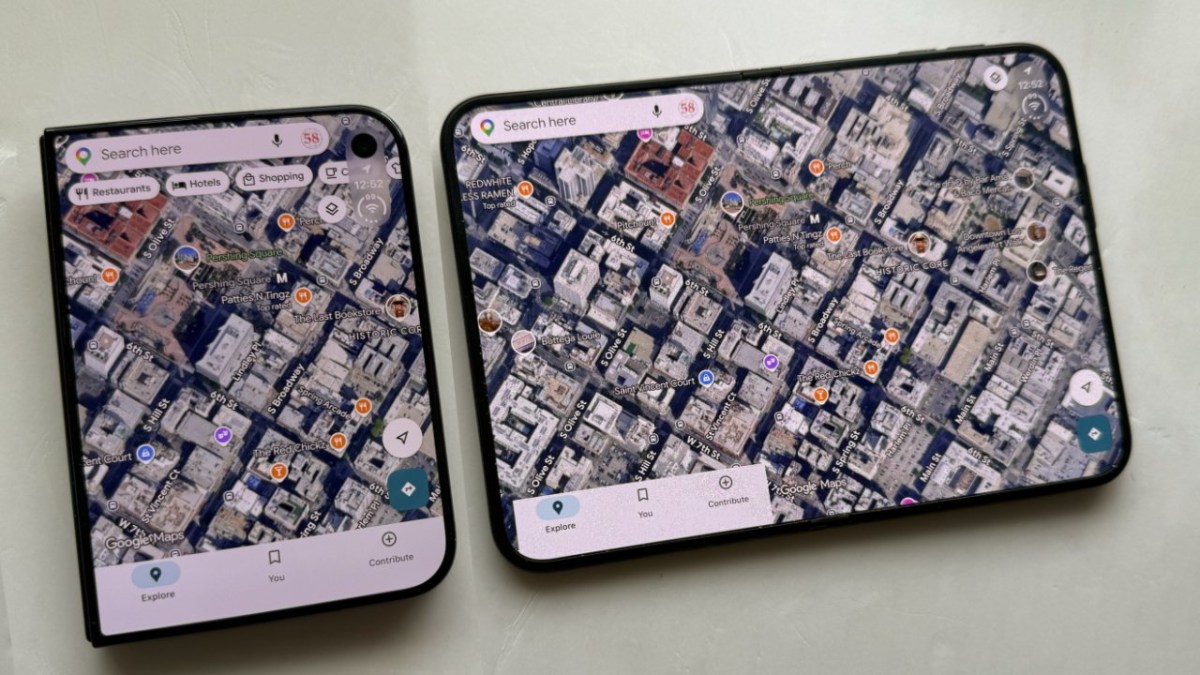
Now, Google Maps fills both screens. That doesn't change much on the outer one, though it does look neater. On the inside, the app now has a wide layout, with the menus and search box on the left and the map or satellite view stretching corner to corner. That makes it a lot like Google Maps on the iPad.
Street View also benefits from the extra width. By default, it takes up the left side of the inner screen and leaves the right side for the map. There seemingly isn't a way to swap the two, but you can make Street View fill the whole screen. If you close the iPhone Duo while in Street View, it moves to the outer screen, and a close button takes you back to the map.
-
 Google is experimenting with a status bar for Wear OS - here is what it looks like
-
 Strava subscribers can now connect directly to Google Gemini for personalized workout insights
-
 Google's Play Store is now selling Pixel and Samsung devices in some regions
-
 Google Play for cars brings Firefox, background playback for YouTube and more
Reader comments
- jinxthesloth
- 7tN
Most apps with big userbases treat release notes section of the app page like: "Release notes frosts my a**. I hate her. I don't f**king know her." Most big successful apps just have same line repeated or have none at all whe...





Tip us
2.1m 180k
RSS
EV
Merch
Log in I forgot my password Sign up