GSMArena.com GSMArena.com

Tip us

2.1m
180k
RSS

EV

Merch

Log in

Login

I forgot my password
Sign up
  • Home
  • News
  • Reviews
  • Videos
  • Featured
  • Phone Finder
  • Deals
  • Merch
  • Coverage
  • Contact
ADVERTISEMENT

Halide gets updated with Rescue and improved raw support

  • Post your comment
  • Comments (17)

Prasad 01 April 2020

Halide iOS

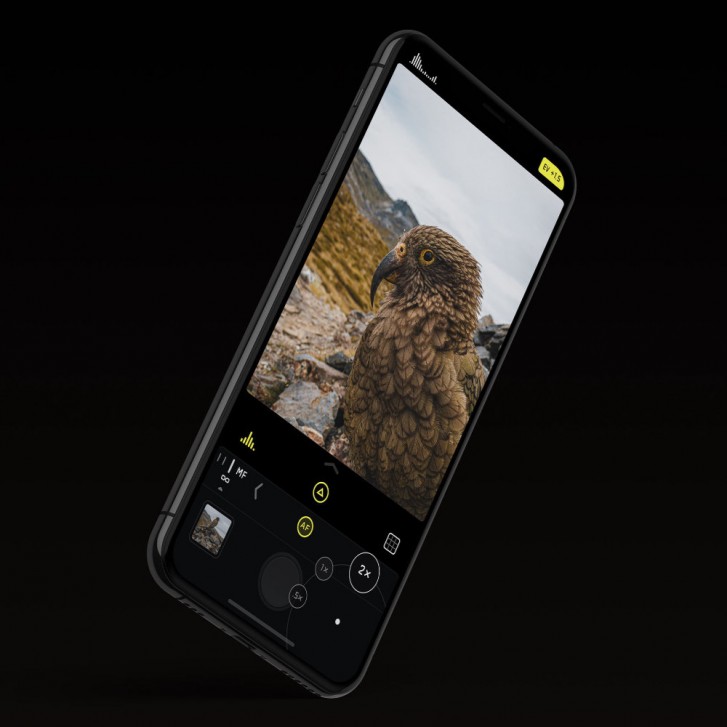
Halide is arguably the best camera application on iOS and is now even better in its latest version 1.16 update. With this, the developers are improving the raw capture experience, memory management and also introducing something new called Rescue.
Halide gets updated with Rescue and improved raw support

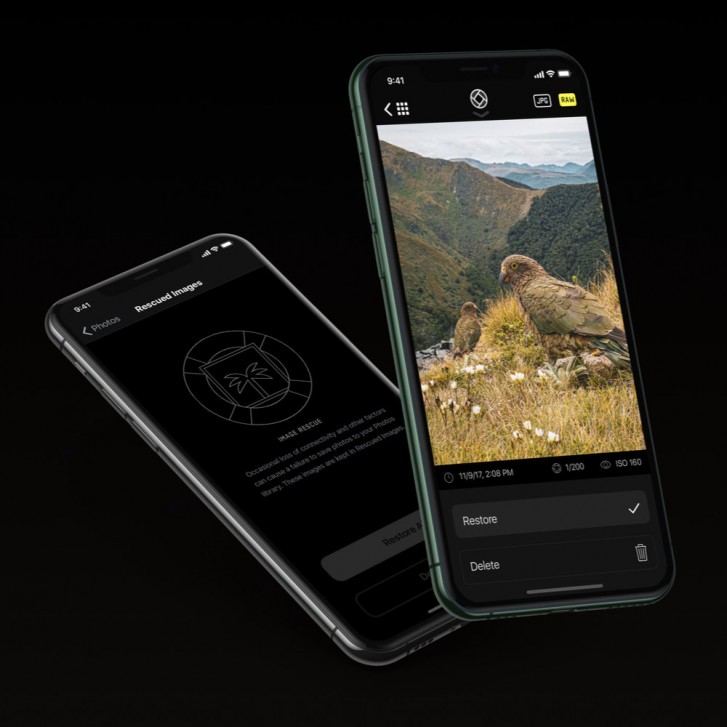
Let's talk about Rescue first. Rescue is a data loss protection feature that prevents losing images in case something critical goes wrong while shooting. It could be something like the phone running out of battery, getting a call or just a bug in iOS or Halide that could cause the shot you've just taken to never be saved to the photo gallery without you even knowing about it. And if it's not in your gallery, it's not going to be in your iCloud backup, either.

To prevent that from happening, Rescue keeps a backup copy of your image that you just took. The backup copy is retained until the app verifies that the original file was saved to the photo gallery. If it is, then the backup is automatically deleted.
Halide gets updated with Rescue and improved raw support

In case you find yourself in a situation where the original was never saved, you can go into the photo gallery within Halide, click on the grid icon in the top left and then the Lifesaver icon in the top right to see all your backup photos.

Aside from that, version 1.16 also improves the raw capture experience. Halide's Smart RAW was already a great feature but the latest version takes advantage of the changes made in iOS 13. This results in more headroom in terms of highlight recovery while shooting in daylight.


Edited Smart RAW files from iPhone 11 Pro shot on Halide Edited Smart RAW files from iPhone 11 Pro shot on Halide Edited Smart RAW files from iPhone 11 Pro shot on Halide Edited Smart RAW files from iPhone 11 Pro shot on Halide
Edited Smart RAW files from iPhone 11 Pro shot on Halide

The raw files also look different now. Previously, iOS would create a generic preview for every raw image on the phone, which would often look too contrasty with washed out highlights. The new flat raw feature in Halide now shows a more flatter image with better exposed highlights and shadows. Of course, this isn't actually changing the actual raw file but the way it is being previewed is being changed so you get a better idea of the image you have shot without opening it in an image editor.


How iOS previews raw files New flat raw files in Halide
How iOS previews raw files • New flat raw files in Halide

Lastly, Halide is also more efficient now. The developers have cut down the memory usage substantially when shooting in Depth Mode, from 515MB on the previous version to just 300MB in the latest. Memory usage while shooting raw files remains at around 150MB. This will cause the app to use the RAM on your iPhone more efficiently and not be force closed by iOS, especially on older iPhones.

Over the coming months, the developers will also be updating their other excellent camera app Spectre with Rescue and the memory optimizations found in Halide.

For a better understanding of all the features explained here, especially the bit about the memory management, check out the blog post by the developer below.

Source

Related articles
  • iPhone 9 cases arriving at retailers in the US iPhone 9 cases arriving at retailers in the US
  • iPhone 12 production is not getting delayed, insider claims iPhone 12 production is not getting delayed, insider claims
  • 21-day lockdown suspends all iPhone production in India 21-day lockdown suspends all iPhone production in India
  • 2020 Fall iPhones  still on schedule despite the COVID-19 outbreak 2020 Fall iPhones still on schedule despite the COVID-19 outbreak

Reader comments

D
  • AnonD-731363
  • Lfw
  • 06 Apr 2020

Aye

  • Reply
C
  • Cpt Mower
  • Gxx
  • 06 Apr 2020

still better than a hedge trimmer

  • Reply
D
  • AnonD-731363
  • Lfw
  • 03 Apr 2020

Still is a scratch from what P40 pro have to offer.

  • Reply
  • Read all comments
  • Post your comment
Total reader comments: 17

Recommended
  • The Samsung W27 goes official in China The Samsung W27 goes official in China
  • Fastest mobile chipsets ranked (2026) Fastest mobile chipsets ranked (2026)
  • Motorola Signature 27 and Razr Flex show up at a European retailer with prices Motorola Signature 27 and Razr Flex show up at a European retailer with prices
  • Chargers explained - how to pick up the right phone charger Chargers explained - how to pick up the right phone charger
ADVERTISEMENT

Phone finder

  • Samsung
  • Apple
  • Huawei
  • Nokia
  • Sony
  • LG
  • HTC
  • Motorola
  • Lenovo
  • Xiaomi
  • Google
  • Honor
  • Oppo
  • Realme
  • OnePlus
  • Nothing
  • vivo
  • Meizu
  • Ulefone
  • Alcatel
  • ZTE
  • RugOne
  • Umidigi
  • Fairphone
  • Oscal
  • Sharp
  • Micromax
  • Infinix
  • Asus
  • Tecno
  • Doogee
  • Blackview
  • Cubot
  • Oukitel
  • Itel
  • TCL

All brands Rumor mill

ADVERTISEMENT

Top 10 by daily interest

  Device Daily hits  
1.Apple iPhone 18 Pro Max16,092
2.Samsung Galaxy S26 Ultra15,113
3.Oppo Find X10 Pro Max14,278
4.Samsung Galaxy A5713,805
5.Xiaomi Poco X8s13,066
6.Motorola Signature 2712,085
7.Samsung Galaxy A1711,596
8.Xiaomi 18 Pro Max11,544
9.OnePlus Ace 7 Pro11,210
10.Nokia 2360 Flip10,339

ELECTRIC VEHICLES

2026 BMW i5 xDrive40 review 2026 BMW i5 xDrive40 review Toyota and Waymo team to deliver driverless taxis in JapanHere's how expensive Ford's upcoming Fathom electric truck will get
ADVERTISEMENT
Ads by Playwire

Home News Reviews Compare Coverage Glossary FAQ RSS Youtube Instagram TikTok Facebook Twitter

© 2000-2026 GSMArena.com Mobile version Android app Tools Contact us Merch store Privacy Terms of use