Infinix Zero 5G review
XOS 10 on top of Android 11
Infinix has its own XOS Android skin, which has already gone through quite a few iterations over the years. So many, in fact that it is a bit hard to keep track of. Our Infinix Note 10 Pro unit originally arrived running XOS 7.6, whereas the Note 11 Pro came with XOS 8 and got updated to XOS 10.

The Zero X Pro came with the same XOS 10 out of the box, and so did the Zero 5G. Yet all these XOS versions are based on Android 11. There's no word on a potential update to Android 12 yet either.
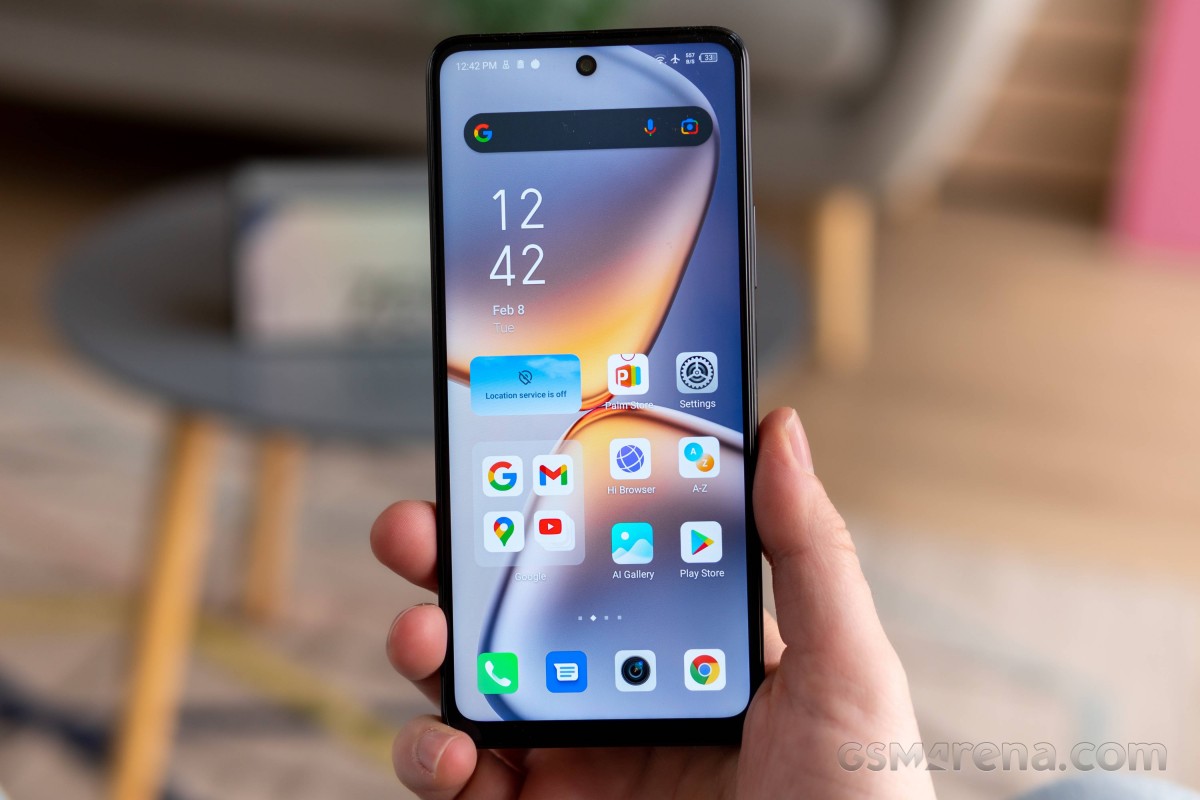
XOS 10 is chuck-full of features and options. Perhaps even overwhelmingly so.
The bloatware is abundant Infinix has included quite a few of its own apps, as well as third-party ones, oftentimes with overlapping feature sets.


A large number of pre-loaded apps
The important thing to note is that XOS 10 works smoothly, with no hiccups or stutters despite the influx of apps. So Infinix has done its job pretty well on that front.
Customization run deep. Starting from the lock screen, you get an optional Magazine service. Beyond that, the clock screen is also affected by the powerful Theme support, which includes things like video slide shows, custom fonts, as well as an online Theme repository in the shape of a separate XTheme app.


Lock screen • Magazine service • Extensive themes support
The home screen includes a custom feed as the leftmost desktop pane, as well as big folders to organize and categorize your shortcuts by default.


Home screen and folders
Of course, if this is not to your liking, you can revert back to just having a list of shortcuts on the home screens, sans folders. And that's just the tip of the iceberg when it comes to customization. You can tweak things like grid size, gestures, notification badges. You can even switch to a vertical rather than horizontal scrolling for the homescreen and change the text color.


Launcher options and customization
XOS 10 is more visually polished overall, with rebound effects and a refreshed look and feel. While not new with XOS 10, it is worth noting that the notification shade and control center are separated out into two separate entities. Notifications are called up with a swipe down from the top left of the phone, while a top-right swipe reveals quick toggles and other controls.


Notifications and quick toggles
We won't be going through every feature and app available in XOS 10, but there are some noteworthy highlights. There is actually a dedicated Special function menu that houses many of these.


Special functions menu
Lightning Multi-Window has a self-explanatory title. It is a floating window implementation. Far from the best we've seen, but still functional.


Lightning Multi-Window
The same goes for Smart Panel. It's among the more customizable implementations of this feature that we have seen.


Smart Panel
Social Turbo houses a whole slew of powerful features meant to work on top of WhatsApp and enhance its factory experience.


Social Turbo features to enhance WhatsApp
MOL is a rather powerful translation engine that works system-wide and can even function offline. Not only can you use it to translate text, but it also features a Face-to-face translator component, which can be used to have an in-person conversation with a foreign speaker. Nothing that's not available as a third-party app, but still quite convenient to just have baked-in.


MOL translator
Naturally, you get other things like extensive gestures, app cloning, known as XClone, as well as some gimmicks like Peek Proof, which "hides" parts of the screen for whatever reason.


Gestures • XClone • Peak Proof
You get in-depth control over battery endurance and power-saving too through the Power Marathon app, including some interesting "smart" AI features.


Power Marathon
Speaking of AI features, XOS 10 has a whole menu of these as one of the highlights of the new version 10 update. AI Assistant can monitor for a number of triggers, gather all sorts of usage data, and then send out notifications and suggest actions accordingly. Definitely worth checking out.


Smart Scenes and Smart Accelerator
Another highlighted XOS 10 feature, or rather set of features, called Monster Game Kit has to do with game optimization. Infinix has a baked-in Dar-Link 2.0 software, which promises AI-driven optimization of games, including frame rate stability, decreasing touch latency and managing hardware performance and temperature. There is a system-wide Game Mode toggle, as well as a Game Mode setting menu to tweak most of the behavior.


Game Mode
The XArena app is your standard game launcher, complete with various tweaks, like notification suppression. Once you add an app to XArena and start it from there, you also get an in-game toolbar with plenty of convenient shortcuts, including floating app support.


XArena and in-game toolbar
Again, this is far from the most cohesive or feature-complete gaming suite we have seen. An fps counter, finer performance controls and some capture/streaming options are notable omissions. Still XOS 10 goes far and beyond most of its Android UI rivals in this department.

In fact, there is no denying that Infinix clearly has an ambitious software effort, bordering on a whole dedicated ecosystem of its own. In case you need any proof of that, consider the Folax voice assistant, which appears to be a totally unique Infinix entry into the niche. A fairly-capable one at that, which doesn't even require a network connection to function.


Folax voice assistant
And then there are also apps like InSync and Welife, which are meant to manage IoT ecosystems. The first appears to be a first-party Infinix one, with support for a range of Infinix smart TVs and an Infinix laptop.


IoT apps and ecosystems
Circling back to our original point about XOS 10, there is truly a lot to cover here, and we barely scratched the surface. If we had to sum up the experience, we would say it is fluent and pleasant from a performance standpoint, but quite chaotic. XOS is still in desperate need of some debloating and organization. Thankfully, for the most part, you can do that yourself with a bit of time and tweaking, and the end result could be a solid Android 11 experience.
Performance and benchmarks
Performance is sort of the main focal point for the Infinix Zero 5G. That and connectivity, but both come courtesy of the upgrade to the MediaTek Dimensity 900 5G chipset. Like we said previously, Infinix phones, even the flagship Zero X Pro, stuck to lower-end MediaTek G series chips, so this is new best by the manufacturer.

The Dimensity 900 has two Cortex-A78 big cores, clocked at up to 2.4GHz, which is markedly better than the pair of Cortex-A76 ones running at 2.05GHz inside the MediaTek Dimensity G96 or G95. Alongside those are six Cortex-A55 units, working at up to 2.0GHz. The GPU inside the Dimensity is also a nice step up from G-series chips - a four-core Mali-G68. All of this inside a modern and efficient 6nm package, compared to the 12nm manufacturing process on G96 and G95 chips.

On top of all that, the Infinix Zero 5G pairs its Dimensity 900 chipset with 8GB of LPDDR5 RAM and 128GB of fast UFS 3.1 storage. These details matter at the end of the day, particularly for system responsiveness.

Infinix is marketing an advanced cooling system for the Zero 5G. In particular, something it calls "Heat Pipe Thermal Module 2.0 & 3-D Cooling Master". The latter likely being a thermal management solution rather than hardware. In practice the Zero 5G doesn't really heat up to the touch even with aggressive and prolonged loads.
Let's kick things off with some pure-CPU loads and GeekBench. First off, while the Dimensity 900 is still not a particularly popular chipset, we do have at least one point for comparison in the Oppo Reno6 5G. We are happy to see that the two devices score very closely across the board, which means that Infinix is making the most out of the chip and not leaving performance on the table.
GeekBench 5 (multi-core)
Higher is better
-
Xiaomi Mi 11 Lite 5G
2909 -
Xiaomi 11 Lite 5G NE
2832 -
Poco X3 Pro
2574 -
Infinix Zero 5G
2169 -
Oppo Reno6 5G
2131 -
Realme 8i
1886 -
Infinix Note 11 Pro
1800 -
Poco M4 Pro 5G
1797 -
Xiaomi Mi 11 Lite 4G
1796 -
Xiaomi Redmi Note 10 Pro
1780 -
Samsung Galaxy A22 5G
1719 -
Realme 8
1690 -
Infinix Zero X Pro
1674 -
Samsung Galaxy A32 5G
1673 -
Infinix Note 10 Pro
1644 -
Xiaomi Redmi Note 10
1599 -
Xiaomi Redmi Note 10S
1576 -
Samsung Galaxy A22
1372 -
Xiaomi Redmi 10
1294 -
Samsung Galaxy A32
1277 -
Samsung Galaxy A03s
889
GeekBench 5 (single-core)
Higher is better
-
Xiaomi Mi 11 Lite 5G
803 -
Xiaomi 11 Lite 5G NE
787 -
Poco X3 Pro
735 -
Oppo Reno6 5G
722 -
Infinix Zero 5G
706 -
Poco M4 Pro 5G
597 -
Xiaomi Redmi Note 10 Pro
569 -
Samsung Galaxy A22 5G
560 -
Xiaomi Mi 11 Lite 4G
560 -
Realme 8i
539 -
Xiaomi Redmi Note 10
534 -
Realme 8
533 -
Infinix Note 11 Pro
520 -
Infinix Note 10 Pro
510 -
Infinix Zero X Pro
506 -
Samsung Galaxy A32 5G
505 -
Xiaomi Redmi Note 10S
502 -
Samsung Galaxy A22
376 -
Xiaomi Redmi 10
361 -
Samsung Galaxy A32
361 -
Samsung Galaxy A03s
179
As expected, the Dimensity 900 is handily beating out its Helio G-series siblings, same goes for Dimensity 700 and 800 chips, as well as most older 700 series Snapdragon chips and definitely the Snapdragon 600 models. It comes shoer of the Snapdragon 778G and 780G chips, as well as the Snapdragon 860 in both single and multi-threaded workloads.
AnTuTu paints a similar picture for overall performance. Since it is a more well-rounded benchmark, it also includes graphics tests and considers memory and storage performance.
AnTuTu 8
Higher is better
-
Poco F3
631850 -
Xiaomi Mi 11 Lite 5G
465534 -
Poco X3 Pro
453223 -
Infinix Zero 5G
419083 -
Oppo Reno6 5G
362450 -
Infinix Zero X Pro
313652 -
Infinix Note 10 Pro
310342 -
Realme 8
298328 -
Poco M4 Pro 5G
296721 -
Xiaomi Redmi Note 10 Pro
295442 -
Realme 8i
293507 -
Infinix Note 11 Pro
290797 -
Xiaomi Mi 11 Lite 4G
290172 -
Samsung Galaxy A22 5G
242155 -
Samsung Galaxy A32 5G
226561 -
Xiaomi Redmi Note 10
218788 -
Samsung Galaxy A22
185358 -
Samsung Galaxy A32
174332 -
Samsung Galaxy A03s
103465
AnTuTu 9
Higher is better
-
Xiaomi 11 Lite 5G NE
527663 -
Xiaomi Mi 11 Lite 5G
522490 -
Infinix Zero 5G
487639 -
Oppo Reno6 5G
430765 -
Infinix Note 10 Pro
365490 -
Infinix Zero X Pro
363939 -
Realme 8
357488 -
Poco M4 Pro 5G
353663 -
Infinix Note 11 Pro
343527 -
Xiaomi Redmi Note 10S
330909 -
Realme 8i
308544 -
Xiaomi Mi 11 Lite 4G
294251 -
Samsung Galaxy A22 5G
223188 -
Samsung Galaxy A32 5G
222125 -
Samsung Galaxy A22
165959 -
Samsung Galaxy A03s
101299
The latter are actually quite important to illustrate the importance of the faster memory Infinix is using. You just need to look at the AnTuTu score of the Reno6 5G, which is also rocking the Dimensity 900 5G chipset, but is stuck with UFS 2.1 storage.
Moving on to graphics tests and GFXBench we see a similar picture for overall performance. The Dimensity 900 and its Mali-G78 MC4 beat out Helio G chips, like the G95 or G96.
GFX Manhattan ES 3.0 (onscreen)
Higher is better
-
Poco X3 Pro
93 -
Xiaomi Mi 11 Lite 5G
78 -
Xiaomi 11 Lite 5G NE
68 -
Infinix Zero 5G
57 -
Infinix Zero X Pro
49 -
Infinix Note 10 Pro
48 -
Realme 8
48 -
Samsung Galaxy A22
42 -
Xiaomi Mi 11 Lite 4G
40 -
Poco M4 Pro 5G
37 -
Realme 8i
33 -
Infinix Note 11 Pro
31 -
Samsung Galaxy A22 5G
31 -
Xiaomi Redmi Note 10
21 -
Samsung Galaxy A32
21 -
Samsung Galaxy A03s
19
GFX Manhattan ES 3.0 (offscreen 1080p)
Higher is better
-
Poco X3 Pro
102 -
Xiaomi Mi 11 Lite 5G
89 -
Xiaomi 11 Lite 5G NE
78 -
Infinix Zero 5G
64 -
Infinix Note 10 Pro
54 -
Infinix Zero X Pro
54 -
Realme 8
53 -
Xiaomi Mi 11 Lite 4G
45 -
Poco M4 Pro 5G
40 -
Infinix Note 11 Pro
37 -
Realme 8i
37 -
Samsung Galaxy A22 5G
32 -
Xiaomi Redmi Note 10
24 -
Samsung Galaxy A32
24 -
Samsung Galaxy A22
24 -
Samsung Galaxy A03s
11
GFX Manhattan ES 3.1 (onscreen)
Higher is better
-
Poco X3 Pro
67 -
Xiaomi Mi 11 Lite 5G
57 -
Xiaomi 11 Lite 5G NE
49 -
Infinix Zero 5G
35 -
Samsung Galaxy A22
30 -
Infinix Zero X Pro
29 -
Xiaomi Mi 11 Lite 4G
29 -
Realme 8
29 -
Infinix Note 10 Pro
28 -
Poco M4 Pro 5G
23 -
Realme 8i
22 -
Samsung Galaxy A22 5G
21 -
Infinix Note 11 Pro
20 -
Xiaomi Redmi Note 10
15 -
Samsung Galaxy A03s
14 -
Samsung Galaxy A32
13
GFX Manhattan ES 3.1 (offscreen 1080p)
Higher is better
-
Poco X3 Pro
75 -
Xiaomi Mi 11 Lite 5G
65 -
Xiaomi 11 Lite 5G NE
56 -
Infinix Zero 5G
43 -
Infinix Zero X Pro
34 -
Infinix Note 10 Pro
33 -
Xiaomi Mi 11 Lite 4G
33 -
Realme 8
33 -
Poco M4 Pro 5G
26 -
Infinix Note 11 Pro
24 -
Samsung Galaxy A22 5G
24 -
Realme 8i
24 -
Xiaomi Redmi Note 10
17 -
Samsung Galaxy A32
15 -
Samsung Galaxy A22
15 -
Samsung Galaxy A03s
7.9
At the top of the chart we once again find the Snapdragon 778G, 780G and 860 with their respective Adreno GPUs. Mind you, you should be looking at off-screen performance to get comparable results not dependent on device resolution.
Things don't change much as the OpenGL ES test difficulty starts to ramp up either.
GFX Car Chase ES 3.1 (onscreen)
Higher is better
-
Poco X3 Pro
38 -
Xiaomi Mi 11 Lite 5G
35 -
Xiaomi 11 Lite 5G NE
28 -
Infinix Zero 5G
19 -
Infinix Zero X Pro
18 -
Realme 8
18 -
Infinix Note 10 Pro
17 -
Xiaomi Mi 11 Lite 4G
17 -
Xiaomi Redmi Note 10 Pro
16 -
Samsung Galaxy A22
16 -
Poco M4 Pro 5G
13 -
Samsung Galaxy A22 5G
12 -
Infinix Note 11 Pro
11 -
Realme 8i
11 -
Samsung Galaxy A32
8.1 -
Xiaomi Redmi Note 10
7.9 -
Samsung Galaxy A03s
5.5
GFX Car Chase ES 3.1 (offscreen 1080p)
Higher is better
-
Poco X3 Pro
45 -
Xiaomi Mi 11 Lite 5G
40 -
Xiaomi 11 Lite 5G NE
33 -
Infinix Zero 5G
25 -
Infinix Note 10 Pro
20 -
Infinix Zero X Pro
20 -
Realme 8
20 -
Xiaomi Redmi Note 10 Pro
19 -
Xiaomi Mi 11 Lite 4G
19 -
Poco M4 Pro 5G
16 -
Infinix Note 11 Pro
14 -
Samsung Galaxy A22 5G
14 -
Realme 8i
14 -
Xiaomi Redmi Note 10
9.3 -
Samsung Galaxy A32
9.3 -
Samsung Galaxy A22
9.3 -
Samsung Galaxy A03s
3.5
GFX Aztek ES 3.1 High (onscreen)
Higher is better
-
Poco X3 Pro
26 -
Xiaomi 11 Lite 5G NE
19 -
Infinix Zero 5G
14 -
Infinix Note 10 Pro
12 -
Infinix Zero X Pro
12 -
Realme 8
12 -
Samsung Galaxy A22
9.2 -
Samsung Galaxy A22 5G
8.4 -
Infinix Note 11 Pro
7.9 -
Xiaomi Redmi Note 10
5.6 -
Samsung Galaxy A32
5
GFX Aztek ES 3.1 High (offscreen 1440p)
Higher is better
-
Poco X3 Pro
17 -
Xiaomi 11 Lite 5G NE
13 -
Infinix Zero 5G
10 -
Infinix Note 10 Pro
7.7 -
Realme 8
7.7 -
Infinix Zero X Pro
7.6 -
Infinix Note 11 Pro
5.6 -
Samsung Galaxy A22 5G
5.5 -
Xiaomi Redmi Note 10
3.7 -
Samsung Galaxy A32
3.3 -
Samsung Galaxy A22
3.3
The same is true when we switch over to Vulkan for our rendering, which is great to see.
GFX Aztek Vulkan High (onscreen)
Higher is better
-
Poco X3 Pro
27 -
Xiaomi 11 Lite 5G NE
20 -
Infinix Zero 5G
13 -
Infinix Note 10 Pro
11 -
Infinix Zero X Pro
11 -
Realme 8
11 -
Samsung Galaxy A22
9.4 -
Samsung Galaxy A22 5G
7.8 -
Infinix Note 11 Pro
7.3 -
Xiaomi Redmi Note 10
5.3 -
Samsung Galaxy A32
4.4
GFX Aztek Vulkan High (offscreen 1440p)
Higher is better
-
Poco X3 Pro
18 -
Xiaomi 11 Lite 5G NE
14 -
Infinix Zero 5G
9.5 -
Infinix Note 10 Pro
7.5 -
Infinix Zero X Pro
7.5 -
Realme 8
7.5 -
Infinix Note 11 Pro
5.1 -
Samsung Galaxy A22 5G
5.1 -
Xiaomi Redmi Note 10
3.5 -
Samsung Galaxy A32
2.9 -
Samsung Galaxy A22
2.9
3DMark is even more generous towards the Infinix Zero 5G and its Dimensity 900 chipset. Particularly in OpenGL testing.
3DMark SSE ES 3.1 (offscreen 1440p)
Higher is better
-
Xiaomi 11 Lite 5G NE
4979 -
Infinix Zero 5G
3845 -
Oppo Reno6 5G
3764 -
Infinix Zero X Pro
2778 -
Infinix Note 10 Pro
2748 -
Samsung Galaxy A32 5G
2638 -
Realme 8
2610 -
Infinix Note 11 Pro
2431 -
Samsung Galaxy A22 5G
2391 -
Xiaomi Redmi Note 10
1471 -
Samsung Galaxy A22
1361 -
Samsung Galaxy A32
1323
3DMark SSE Vulkan 1.0 (offscreen 1440p)
Higher is better
-
Xiaomi 11 Lite 5G NE
4608 -
Oppo Reno6 5G
3818 -
Infinix Zero 5G
3558 -
Infinix Zero X Pro
2860 -
Infinix Note 10 Pro
2854 -
Realme 8
2639 -
Samsung Galaxy A32 5G
2509 -
Samsung Galaxy A22 5G
2257 -
Infinix Note 11 Pro
2256 -
Samsung Galaxy A22
1383 -
Xiaomi Redmi Note 10
1372 -
Samsung Galaxy A32
1371
3DMark Wild Life Vulkan 1.1 (offscreen 1440p)
Higher is better
-
Poco X3 Pro
3401 -
Xiaomi Mi 11 Lite 5G
3136 -
Xiaomi 11 Lite 5G NE
2477 -
Infinix Zero 5G
2035 -
Oppo Reno6 5G
2024 -
Infinix Zero X Pro
1509 -
Infinix Note 10 Pro
1506 -
Realme 8
1486 -
Poco M4 Pro 5G
1232 -
Samsung Galaxy A32 5G
1185 -
Xiaomi Mi 11 Lite 4G
1113 -
Samsung Galaxy A22 5G
1104 -
Realme 8i
1102 -
Infinix Note 11 Pro
1100 -
Samsung Galaxy A22
691 -
Samsung Galaxy A32
686 -
Xiaomi Redmi Note 10
482
All things considered, the Infinix Zero 5G is a great all-around performer. It makes the most out of its MediaTek Dimensity 900 5G chipset in every aspect. The fast UFS 3.1 storage is an appreciated addition in an observable way too. XOS is not holding the Zero 5G back either. You get an excellent budget performer with a powerful and efficient chip with potent and modern connectivity to boot.


Tip us
2.1m 180k
RSS
EV
Merch
Log in I forgot my password Sign up