OnePlus Nord CE 3 Lite hands-on review
Software
The Nord CE 3 Lite runs on OxygenOS 13.1 running on top of Android 13. At this point, there is no real difference between OxygenOS 13.1 and Realme UI 4.0, which itself is no different from ColorOS 13. If you have seen one, you have seen them all. As such, the Nord CE 3 Lite basically feels like the Realme 10 Pro in use.

The UI is fairly customizable, with support for custom fonts, icons, colors, and even full-fledged themes. The notification drawer also has a very custom look with a mishmash of stock Android and iOS design elements but it works fine for the most part. Things such as the reserved section at the top right for audio playback are especially handy as it doesn't take up notification space below.



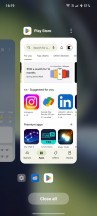
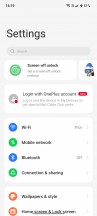
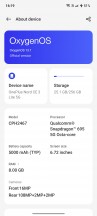
OxygenOS 13.1
Multi-tasking is also expanded over stock Android. Aside from the usual split-screen mode, you can open some apps in their own floating windows, which can be pinned at the top or to the sides of the display. Smart sidebar lets you keep frequently used apps in a special drawer attached to the side of the screen that can be accessed from anywhere. If you are using navigation gestures, you can also swipe and hold from the edge to go to the previous app.
One feature missing due to the LCD display is an always-on mode. This means the display turns off instantly when powered down and cannot be left on to display time and other information.
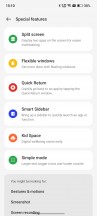

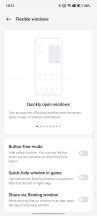



Features and settings
Other features are pretty much what we have come to expect, such as a dark mode, adaptive sleep that only turns off the display when you aren't looking, app cloner to create two instances of apps that don't let you use two accounts at the same time, and an optional battery health feature that waits to charge past 80% until just before you start using your device. There is also air gesture support that lets you wave your hand in front of the phone to answer or mute calls.

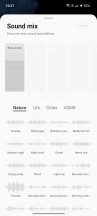







O Relax, Zen Space, and Internet browser
The Nord CE 3 Lite also includes the Zen Space app to help you focus without the phone distracting you by simply preventing you from using it. There's also Oppo's O Relax app, which includes a variety of comforting music tracks and ambient nature sounds to relax but they all kind of sound a bit too compressed for our liking and it's more distracting than relaxing.
The Nord CE 3 Lite doesn't include a lot of bloatware but there are a lot of duplicate apps. For some reason, the phone has two web browsers, two photo galleries, and two file managers. One of those is from Google, which makes it mandatory to include them. These apps are good enough for OnePlus/Oppo to not bother including their own version but they do it anyway and keep adding more.
Performance
The Nord CE 3 Lite runs on the Qualcomm Snapdragon 695, which is not just identical to the chipset on the Realme 10 Pro but also the previous generation Nord CE 2 Lite. Coupled with that is 8GB of LPDDR4X memory and a choice of 128GB or 256GB UFS 2.2 storage with microSD expansion. A virtual memory expansion feature lets you create a 4/6/8GB page file on the storage to swap from when the device runs out of system memory.
The performance from this chipset is adequate at best. Admittedly, it does perform a bit better than the Nord CE 2 Lite, which often felt quite sluggish, and this may be down to the newer software on the CE 3 Lite. Still, you can feel some slowdowns and hitches every now and then while scrolling or multitasking. One particular annoyance is the somewhat slow touchscreen response at times, where it will just not register your inputs.
What makes the performance feel worse than it is is the refresh rate often being lower than 120Hz. At 120Hz, the phone feels fine to use. At 90Hz, it's still okay most of the time. But the Nord CE 3 Lite will often just drop down to 60Hz and then it's like you are back in the year 2018.
Gaming performance is also lackluster unless you are mostly into simple arcade games. It doesn't help that the display is again fixed to just 60Hz in most of them.
GeekBench 5 (multi-core)
Higher is better
-
Xiaomi 12 Lite
2943 -
Xiaomi 13 Lite
2936 -
OnePlus Nord 2T
2790 -
Samsung Galaxy A54
2703 -
Realme 10 Pro+
2371 -
Xiaomi Redmi Note 12 Pro
2229 -
Redmi Note 11 Pro+ 5G
2225 -
Poco X5
2088 -
Redmi Note 11 Pro 5G
2063 -
OnePlus Nord CE 3 Lite 5G
2052 -
Realme 10 Pro
2021 -
Xiaomi Redmi Note 12
1998 -
OnePlus Nord CE 2 Lite 5G
1956 -
Galaxy A53 5G
1891 -
Xiaomi Redmi Note 12 4G
1797 -
Redmi Note 10 Pro
1780
GeekBench 5 (single-core)
Higher is better
-
Realme 10 Pro+
842 -
Xiaomi 13 Lite
795 -
Xiaomi 12 Lite
785 -
Samsung Galaxy A54
770 -
Xiaomi Redmi Note 12 Pro
758 -
Galaxy A53 5G
743 -
Redmi Note 11 Pro+ 5G
736 -
Realme 10 Pro
698 -
OnePlus Nord CE 2 Lite 5G
694 -
Poco X5
693 -
OnePlus Nord CE 3 Lite 5G
692 -
Redmi Note 11 Pro 5G
688 -
Xiaomi Redmi Note 12
588 -
Redmi Note 10 Pro
569 -
OnePlus Nord 2T
491 -
Xiaomi Redmi Note 12 4G
440
AnTuTu 9
Higher is better
-
OnePlus Nord 2T
604467 -
Xiaomi 13 Lite
534143 -
Xiaomi 12 Lite
528905 -
Realme 10 Pro+
522376 -
Samsung Galaxy A54
506678 -
Xiaomi Redmi Note 12 Pro
490526 -
Redmi Note 11 Pro+ 5G
437872 -
OnePlus Nord CE 3 Lite 5G
412006 -
Realme 10 Pro
401860 -
Poco X5
400895 -
OnePlus Nord CE 2 Lite 5G
399306 -
Redmi Note 11 Pro 5G
382902 -
Galaxy A53 5G
379313 -
Xiaomi Redmi Note 12
360745 -
Xiaomi Redmi Note 12 4G
319219
GFX Car Chase ES 3.1 (onscreen)
Higher is better
-
OnePlus Nord 2T
40 -
Xiaomi 13 Lite
33 -
Xiaomi 12 Lite
29 -
Samsung Galaxy A54
25 -
Xiaomi Redmi Note 12 Pro
22 -
Redmi Note 11 Pro+ 5G
22 -
Realme 10 Pro+
21 -
Galaxy A53 5G
19 -
OnePlus Nord CE 3 Lite 5G
17 -
OnePlus Nord CE 2 Lite 5G
17 -
Redmi Note 11 Pro 5G
17 -
Realme 10 Pro
16 -
Redmi Note 10 Pro
16 -
Xiaomi Redmi Note 12 4G
7.5
GFX Car Chase ES 3.1 (offscreen 1080p)
Higher is better
-
OnePlus Nord 2T
50 -
Xiaomi 13 Lite
39 -
Xiaomi 12 Lite
33 -
Samsung Galaxy A54
31 -
Realme 10 Pro+
27 -
Xiaomi Redmi Note 12 Pro
26 -
Redmi Note 11 Pro+ 5G
25 -
Galaxy A53 5G
23 -
OnePlus Nord CE 3 Lite 5G
20 -
OnePlus Nord CE 2 Lite 5G
20 -
Realme 10 Pro
19 -
Redmi Note 10 Pro
19 -
Redmi Note 11 Pro 5G
19 -
Xiaomi Redmi Note 12 4G
8.6
GFX Aztek Vulkan High (onscreen)
Higher is better
-
OnePlus Nord 2T
29 -
Xiaomi 13 Lite
23 -
Xiaomi 12 Lite
19 -
Samsung Galaxy A54
19 -
Realme 10 Pro+
15 -
Xiaomi Redmi Note 12 Pro
15 -
Galaxy A53 5G
15 -
OnePlus Nord CE 3 Lite 5G
12 -
OnePlus Nord CE 2 Lite 5G
12 -
Realme 10 Pro
12 -
Redmi Note 11 Pro 5G
12 -
Xiaomi Redmi Note 12 4G
5.3
GFX Aztek Vulkan High (offscreen 1440p)
Higher is better
-
OnePlus Nord 2T
20 -
Xiaomi 13 Lite
17 -
Xiaomi 12 Lite
15 -
Samsung Galaxy A54
13 -
Realme 10 Pro+
10 -
Xiaomi Redmi Note 12 Pro
10 -
Galaxy A53 5G
10 -
Realme 10 Pro
8.3 -
OnePlus Nord CE 3 Lite 5G
8.2 -
OnePlus Nord CE 2 Lite 5G
8.2 -
Redmi Note 11 Pro 5G
8 -
Xiaomi Redmi Note 12 4G
3.6


Tip us
2.1m 180k
RSS
EV
Merch
Log in I forgot my password Sign up