GSMArena.com GSMArena.com

Tip us

2.1m
180k
RSS

EV

Merch

Log in

Login

I forgot my password
Sign up
  • Home
  • News
  • Reviews
  • Videos
  • Featured
  • Phone Finder
  • Deals
  • Merch
  • Coverage
  • Contact
ADVERTISEMENT
GSMArena Team, 15 July 2017

Selfie master


Oppo R11 review: Selfie master

  • Comments (50)
  • User reviews
  • R11

4. Software overview
  1. 1. Introduction
  2. 2. Unboxing, 360-degree spin, design
  3. 3. Display, battery life, connectivity
  4. 4. Software overview
  5. 5. Performance
  6. 6. Telephony, loudspeaker, pre-installed apps
  7. 7. Multimedia, audio quality
  8. 8. Camera, video recording
  9. 9. Conclusion
  10.  
  11. Oppo R11 specification
  12. User opinions and reviews
  13. Review comments (50)

Oppo Android Dual SIM

Nougat and ColorOS 3.1

The Oppo R11 runs ColorOS 3.1, based on Android 7.1.1 Nougat. The new v3.1 launcher introduces WeChat payments via fingerprints, a dedicated night mode, and more refined interface. Naturally, the level of customization runs deep within the ROM, making it far off from the standard Google-developed mobile experience. Units sold outside of China still come with the full Google suite, which has resulted in having a few apps with similar functionality - one by Oppo, and another one by Google.
Oppo R11 review

The OS isn't the most bloated, but we wouldn't call it a "clean installation" either. It comes pre-loaded with social networking apps, a document editor, and few minor-footprint apps.

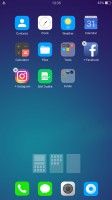
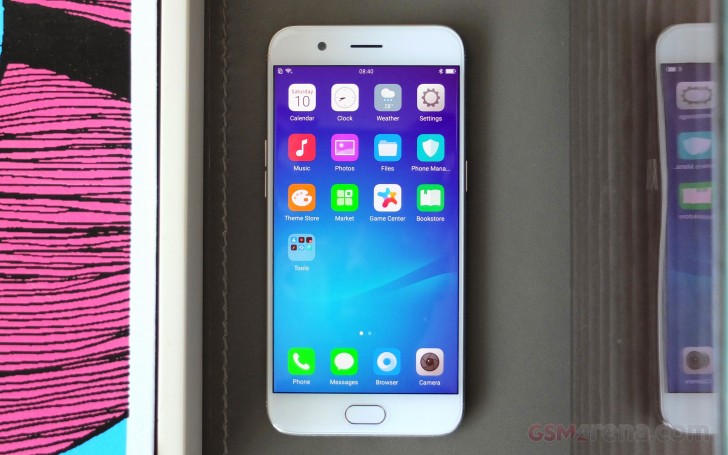
The user interface is the familiar mash-up of Android and iOS in looks. There's no app drawer on the default launcher. Instead, every app you install gets dumped onto the homescreen.
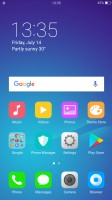
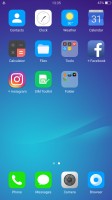
The homescreen houses all installed apps - Oppo R11 review The homescreen houses all installed apps - Oppo R11 review The homescreen houses all installed apps - Oppo R11 review
The homescreen houses all installed apps

The Lockscreen features a constantly changing slideshow of images. You can subscribe to several different channels (e.g. photos of nature or cars or others) or provide your own imagery. The set of photos will be updated periodically, but only over a Wi-Fi connection, so it doesn't eat into your mobile data plan.

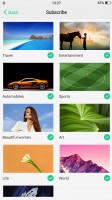
Lockscreen settings - Oppo R11 review Subscribing to different photo streams - Oppo R11 review The lockscreen - Oppo R11 review The lockscreen - Oppo R11 review
Lockscreen settings • Subscribing to different photo streams • The lockscreen • The lockscreen

Once you set up the fingerprint reader - and you'll want to do that as otherwise the Home button can't wake the phone - you'll rarely see the lockscreen anyway. You could wake the phone with the Home button when the fingerprint reader is not set up, but that requires a few consecutive taps and you might as well double tap the screen (a configurable option).

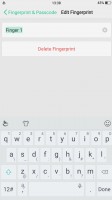
The sensor is snappy and reliable with amazing recognition speed. It can secure more than the lockscreen - the phone can encrypt individual files or even whole apps, and make them accessible only with the correct fingerprint (or a Pattern lock as a fallback).
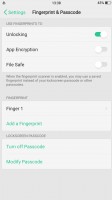
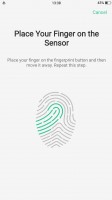
Setting up the fingerprint reader - Oppo R11 review Setting up the fingerprint reader - Oppo R11 review Setting up the fingerprint reader - Oppo R11 review
Setting up the fingerprint reader

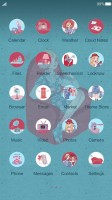
The wallpaper on the homescreen doesn't change as the lockscreen wallpaper does, but you can still spruce up the place with Themes. The Theme Store features whole themes and just wallpapers, sorted into categories (including free and paid ones). Themes change the icon pack, the lockscreen wallpaper, and even the system font.
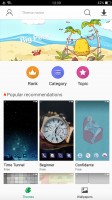
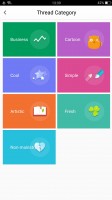
Theme Store - Oppo R11 review Categories - Oppo R11 review A new theme - Oppo R11 review Another theme - Oppo R11 review And another theme - Oppo R11 review
Theme Store • Categories • A new theme • Another theme • And another theme

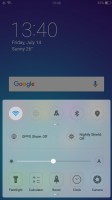
The notification shade features only notifications and nothing else. The toggles, brightness bar, music controls, Oppo Quick Share, and various app shortcuts are all placed in a Control Center-like second shade, which you pull up from the bottom. Yes, it's like iOS through and through.
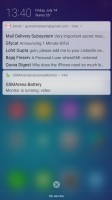

Notification area - Oppo R11 review It supports expanded notification - Oppo R11 review The Toggles pop up from the bottom - Oppo R11 review
Notification area • It supports expanded notification • The Toggles pop up from the bottom

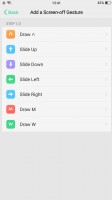
One of the ColorOS highlights is the Screen-off gestures. They are simple commands done on a black screen - O to start the camera, V for the flashlight, several symbols to control the music player and a few custom options.
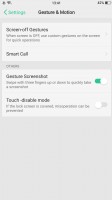
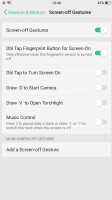
Screen-off gestures allow you to control the phone without waking it - Oppo R11 review Screen-off gestures allow you to control the phone without waking it - Oppo R11 review Screen-off gestures allow you to control the phone without waking it - Oppo R11 review Screen-off gestures allow you to control the phone without waking it - Oppo R11 review
Screen-off gestures allow you to control the phone without waking it

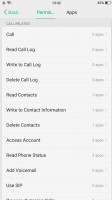
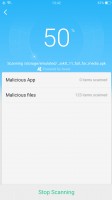
Finally, there is a Phone Manager quite similar to what Huawei and Xiaomi have with the same name. It handles memory cleaner functions, app permissions and encryption, and virus scan, among other things.
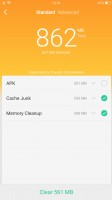

Phone Manager - Oppo R11 review Phone Manager - Oppo R11 review Phone Manager - Oppo R11 review Phone Manager - Oppo R11 review Phone Manager - Oppo R11 review

Phone Manager

Next Page » 5. Performance
4. Software overview
  1. 1. Introduction
  2. 2. Unboxing, 360-degree spin, design
  3. 3. Display, battery life, connectivity
  4. 4. Software overview
  5. 5. Performance
  6. 6. Telephony, loudspeaker, pre-installed apps
  7. 7. Multimedia, audio quality
  8. 8. Camera, video recording
  9. 9. Conclusion
  10.  
  11. Oppo R11 specification
  12. User opinions and reviews
  13. Review comments (50)

Reviews Oppo R11 reviewPage 4
  • Comments (50)
  • User reviews
  • R11

Phone finder

  • Samsung
  • Apple
  • Huawei
  • Nokia
  • Sony
  • LG
  • HTC
  • Motorola
  • Lenovo
  • Xiaomi
  • Google
  • Honor
  • Oppo
  • Realme
  • OnePlus
  • Nothing
  • vivo
  • Meizu
  • Ulefone
  • Alcatel
  • ZTE
  • RugOne
  • Umidigi
  • Fairphone
  • Oscal
  • Sharp
  • Micromax
  • Infinix
  • Asus
  • Tecno
  • Doogee
  • Blackview
  • Cubot
  • Oukitel
  • Itel
  • TCL

All brands Rumor mill

ADVERTISEMENT

Popular reviews

Oppo Find X10 Pro Max review
Apple iPhone 18 Pro Max review
Apple iPhone 18 Pro review
ADVERTISEMENT

ELECTRIC VEHICLES

Volkswagen takes the slow road to hands-off driving in China Volkswagen takes the slow road to hands-off driving in China XPeng sends Mona L05 to customers abroad ahead of Chinese launchAudi announces major restructuring of China operations with brand split
ADVERTISEMENT
Ads by Playwire

Home News Reviews Compare Coverage Glossary FAQ RSS Youtube Instagram TikTok Facebook Twitter

© 2000-2026 GSMArena.com Mobile version Android app Tools Contact us Merch store Privacy Terms of use