Realme X3 hands-on review
Software
The Realme X3 runs Android 10 with an in-house layer of Realme UI on top. We've had plenty of experience with it on the X3 SuperZoom and multiple units from the 6-series and we're liking its more relaxed approach to customization and more stock-ish look than previous iterations.
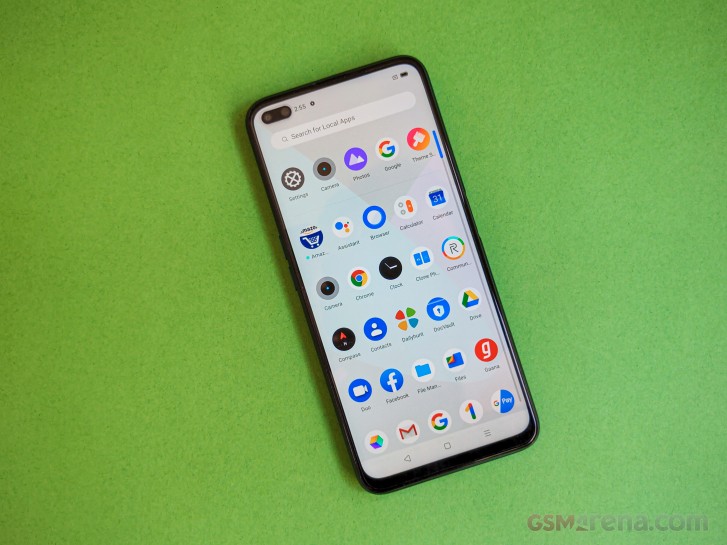
The UI defaults to a nav bar for navigation but you can opt for gestures in settings. Folders open full screen, but the icons remain within easy reach. An app drawer is also present with a row of suggested apps up top. The pre-installed apps are mostly the same as on other recent Realmes, but the App Market, for example, is missing.






Lockscreen • Folder view • Tools • App drawer • Quick settings • Task switcher
The 120-hertz display is one of the Realme X3's key selling points. In the Settings menu, you get to select between an auto mode that'll pick the best refresh rate for the task at hand, or forced 60Hz or 120Hz setting. Much like the SuperZoom, the X3 wouldn't always respect these settings - all in the name of power-saving, of course - and it will adjust the refresh rate as it sees fit in both Auto and 120Hz mode.
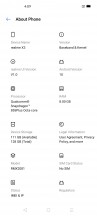

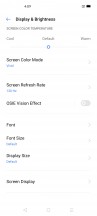
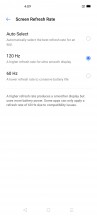
About screen • Settings menu • Display settings • Refresh rate options
One observation we had was that the X3 has the Google default apps for Dialer and Messages, as opposed to the in-house customized solutions we've seen previously. Realme tells us that will be the case going forward.
Benchmarks
The Realme X3 is powered by the Snapdragon 855+ chipset - the beefed up version of Qualcomm's 2019 flagship-grade silicon. That's shared with the X3 SuperZoom from this year, but also the slightly older X2 Pro. Meanwhile, the X2 from 2019 uses the midrange 730G, while this year's 6 Pro opts for a 720G. We ran a bunch of benchmarks on the Realme X3 and here are the results.
GeekBench 4.4 (multi-core)
Higher is better
-
Samsung Galaxy S10 Lite
11151 -
Realme X3 (hands-on)
10493 -
Realme X3 SuperZoom
10115 -
Huawei P40 Lite
7846 -
LG Velvet
7660 -
Realme 6 Pro
7027 -
Xiaomi Redmi K30
7008 -
Realme X2
6926 -
Xiaomi Mi Note 10 Lite
6639
GeekBench 4.4 (single-core)
Higher is better
-
Realme X3 (hands-on)
3683 -
Realme X3 SuperZoom
3553 -
Samsung Galaxy S10 Lite
3524 -
Huawei P40 Lite
2844 -
LG Velvet
2708 -
Realme 6 Pro
2643 -
Xiaomi Redmi K30
2558 -
Realme X2
2508 -
Xiaomi Mi Note 10 Lite
2429
GeekBench 5.1 (multi-core)
Higher is better
-
Samsung Galaxy S10 Lite
2732 -
Realme X3 SuperZoom
2579 -
Realme X3 (hands-on)
2572 -
LG Velvet
1905 -
Motorola Edge
1862 -
Huawei P40 Lite
1862 -
Xiaomi Redmi Note 9 Pro
1785 -
Realme X2
1750 -
Xiaomi Mi Note 10 Lite
1694 -
Xiaomi Redmi K30
1692 -
Realme 6 Pro
1666
GeekBench 5.1 (single-core)
Higher is better
-
Realme X3 (hands-on)
790 -
Realme X3 SuperZoom
756 -
Samsung Galaxy S10 Lite
738 -
Huawei P40 Lite
591 -
Motorola Edge
586 -
LG Velvet
586 -
Xiaomi Redmi Note 9 Pro
571 -
Realme 6 Pro
565 -
Xiaomi Redmi K30
548 -
Realme X2
545 -
Xiaomi Mi Note 10 Lite
521
AnTuTu 8
Higher is better
-
Realme X3 (hands-on)
487203 -
Realme X3 SuperZoom
477905 -
Samsung Galaxy S10 Lite
459497 -
Huawei P40 Lite
325777 -
Motorola Edge
305989 -
LG Velvet
297372 -
Xiaomi Redmi Note 9 Pro
279625 -
Xiaomi Redmi K30
272229 -
Realme 6 Pro
268785 -
Realme X2
257443 -
Xiaomi Mi Note 10 Lite
253271
GFX 3.1 Manhattan (1080p offscreen)
Higher is better
-
Realme X3 (hands-on)
74 -
Samsung Galaxy S10 Lite
69 -
Realme X3 SuperZoom
65 -
Motorola Edge
34 -
Huawei P40 Lite
34 -
LG Velvet
33 -
Xiaomi Redmi Note 9 Pro
31 -
Xiaomi Redmi K30
30 -
Xiaomi Mi Note 10 Lite
30 -
Realme 6 Pro
30 -
Realme X2
29
GFX 3.1 Manhattan (onscreen)
Higher is better
-
Realme X3 SuperZoom
56 -
Samsung Galaxy S10 Lite
56 -
Realme X3 (hands-on)
45 -
Motorola Edge
32 -
Huawei P40 Lite
30 -
LG Velvet
29 -
Xiaomi Redmi K30
27 -
Realme 6 Pro
27 -
Xiaomi Mi Note 10 Lite
26 -
Xiaomi Redmi Note 9 Pro
26 -
Realme X2
24
GFX 3.1 Car scene (1080p offscreen)
Higher is better
-
Realme X3 (hands-on)
47 -
Samsung Galaxy S10 Lite
43 -
Realme X3 SuperZoom
41 -
Huawei P40 Lite
21 -
Motorola Edge
19 -
LG Velvet
19 -
Realme 6 Pro
18 -
Xiaomi Redmi Note 9 Pro
18 -
Xiaomi Redmi K30
17 -
Xiaomi Mi Note 10 Lite
17 -
Realme X2
16
GFX 3.1 Car scene (onscreen)
Higher is better
-
Realme X3 (hands-on)
42 -
Realme X3 SuperZoom
35 -
Samsung Galaxy S10 Lite
34 -
Motorola Edge
18 -
Huawei P40 Lite
18 -
LG Velvet
16 -
Realme 6 Pro
16 -
Xiaomi Redmi K30
15 -
Xiaomi Mi Note 10 Lite
15 -
Xiaomi Redmi Note 9 Pro
15 -
Realme X2
13


Tip us
2.1m 180k
RSS
EV
Merch
Log in I forgot my password Sign up