GSMArena.com GSMArena.com

Tip us

2.1m
180k
RSS

EV

Merch

Log in

Login

I forgot my password
Sign up
  • Home
  • News
  • Reviews
  • Videos
  • Featured
  • Phone Finder
  • Deals
  • Merch
  • Coverage
  • Contact
ADVERTISEMENT

Twitter finally rolling out OLED-friendly dark mode to all its Android users

  • Post your comment
  • Comments (13)

Sagar 23 October 2019

Twitter Android Social networks Mobile software Online services

Twitter rolled out an OLED-friendly dark mode called "Lights out" for its iOS app back in March this year. And last week, it was activated for those who were using the alpha version of the Android app. Now, the company has announced that lights out is finally rolling out to all the users of its Android app.

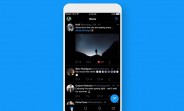
Unlike the old dark mode, which is now called "Dim", lights out turns the UI of the app to true black, which does a better job at power consumption on devices that sport an OLED display. The images below show the difference between both modes.
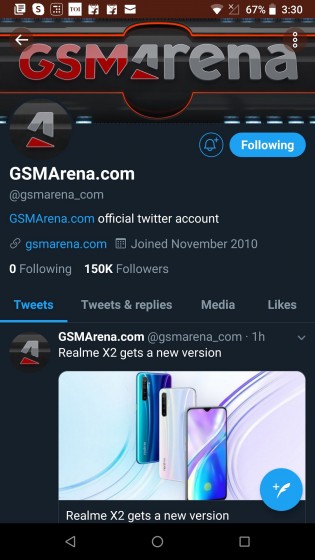
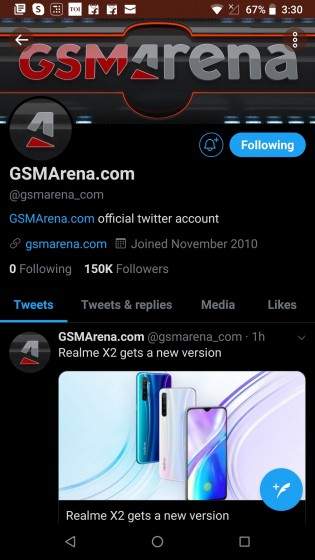
This is the old night mode which is now called Dim This is the new OLED-friendly dark mode called Lights out
'Dim' mode (left) vs 'Lights out' mode (right)

To enable the lights out mode, you can head over to the Settings and privacy > Display and sound menu. There, you will see a new sub-menu called "Dark mode appearance", under which you will find two options - Dim and Lights out. Choosing Dim will turn the UI of the app to a shade of dark blue, while Lights out will turn it to pitch black.
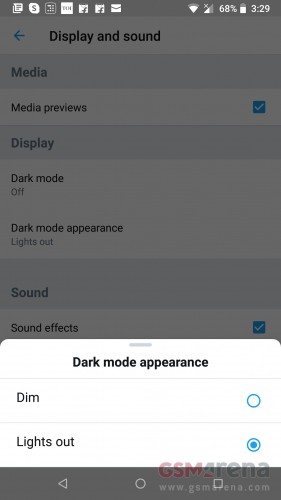
Twitter for Android finally gets OLED-friendly dark mode

You can quickly turn on/off the dark mode on Twitter by tapping on the light bulb icon at the bottom of the slide-out menu, which is accessed from the home screen by tapping on your profile picture or swiping right.

This OLED-friendly dark mode is rolling out to all Android users with the latest version of the app, which is 8.18.0. But if you don't see it despite using the latest version, you can enable it manually by following the steps detailed by 9to5Google, which require you to force stop the Twitter app and clear its storage.

After that, re-open the Twitter app and immediately force stop it once again. This method worked for us on all our Android smartphones. Try it out and let us know if it worked for you.

Source

Related articles
  • Twitter for iOS gets OLED-friendly dark mode Twitter for iOS gets OLED-friendly dark mode
  • Twitter's Android app gets OLED-friendly dark mode in new alpha build Twitter's Android app gets OLED-friendly dark mode in new alpha build
  • Twitter adds new policy aimed at high-profile government officials Twitter adds new policy aimed at high-profile government officials
  • Twitter for iOS revives the reverse-chronological feed Twitter for iOS revives the reverse-chronological feed

Reader comments

P
  • Puzzled
  • fwq
  • 24 Oct 2019

So how is dark mode bad for use again? Nothing on all those articles takes about dark mode having adverse effects on us.

  • Reply
M
  • Magicdave99
  • MhZ
  • 24 Oct 2019

The app already has a dark mode It's just not completely black

  • Reply
A
  • AlienFromNextDoor
  • JK1
  • 24 Oct 2019

Ya'll should be forced off the internet for good. How can you all be this uninformed?!?!?!?! https://www.howtogeek.com/423717/dark-mode-isn%E2%80%99t-better-for-you-but-we-love-it-anyway/ https://gizmodo.com/the-surprising-reason-computer-s...

  • Reply
  • Read all comments
  • Post your comment
Total reader comments: 13

Recommended
  • Weekly poll results: the OnePlus 16 could have been a global hit Weekly poll results: the OnePlus 16 could have been a global hit
  • We are on TikTok, follow us for exclusive content We are on TikTok, follow us for exclusive content
  • CMF Speaker S unboxing and hands-on CMF Speaker S unboxing and hands-on
  • Chargers explained - how to pick up the right phone charger Chargers explained - how to pick up the right phone charger
ADVERTISEMENT

Phone finder

  • Samsung
  • Apple
  • Huawei
  • Nokia
  • Sony
  • LG
  • HTC
  • Motorola
  • Lenovo
  • Xiaomi
  • Google
  • Honor
  • Oppo
  • Realme
  • OnePlus
  • Nothing
  • vivo
  • Meizu
  • Ulefone
  • Alcatel
  • ZTE
  • RugOne
  • Umidigi
  • Fairphone
  • Oscal
  • Sharp
  • Micromax
  • Infinix
  • Asus
  • Tecno
  • Doogee
  • Blackview
  • Cubot
  • Oukitel
  • Itel
  • TCL

All brands Rumor mill

ADVERTISEMENT

Top 10 by daily interest

  Device Daily hits  
1.Oppo Find X10 Pro Max22,940
2.Apple iPhone 18 Pro Max17,890
3.Xiaomi Poco X8s16,491
4.Samsung Galaxy S26 Ultra15,357
5.Samsung Galaxy A5714,393
6.Xiaomi 18 Pro Max14,222
7.Apple iPad mini (2026)13,262
8.Apple iPhone Duo13,182
9.Honor X9e Pro12,071
10.Samsung Galaxy A1711,959

ELECTRIC VEHICLES

Volkswagen takes the slow road to hands-off driving in China Volkswagen takes the slow road to hands-off driving in China XPeng sends Mona L05 to customers abroad ahead of Chinese launchAudi announces major restructuring of China operations with brand split
ADVERTISEMENT
Ads by Playwire

Home News Reviews Compare Coverage Glossary FAQ RSS Youtube Instagram TikTok Facebook Twitter

© 2000-2026 GSMArena.com Mobile version Android app Tools Contact us Merch store Privacy Terms of use