Light in motion
Huawei P8 review: Light in motion

Standard phonebook
The Huawei P8 phonebook is laid out across three tabs that can be navigated by swipes. It actually resides in a single application along with the dialer and messenger.
An alphabetical list on the right can help you jump to a specific letter or you can just use the search function. Tapping on a contact brings up a popup with access to a contact's scrollable info.


Straight-forward contacts experience
As on most Android launchers, you can input a variety of contact information including custom ringtones and images. You can link contacts too, if you've added the same person on multiple services.
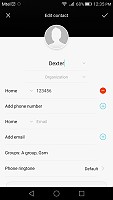

Lots of contact fields available
The phonebook supports blacklist option for blocking contacts.
Telephony is excellent
The Huawei P8 held on to signal excellently and in-call sound was just fine. The proximity sensor makes sure the screen stays off when you hold the phone to your ear.
Flipping the phone on its face while it's ringing would mute the call ringing. Alternatively, picking the phone to your ear while it's ringing, automatically answers the call. A sea of other customizable gestures is also available, as already mentioned.
The secondary noise cancelling on-board microphone ensures a quieter background for your voice while in call.
The dialer and the call log share the same screen. The dialer offers smart dialing and it works both with names and numbers. It can also be docked to one side or the other for easy accessibility, or, span the entire lengths of the screen.


Dialer has a convenient one-handed operation mode
We put the P8 through our traditional loudspeaker test and it got an Average score, even, rather on the quiet side. It still surpassed its predecessor, the Ascend P7, but, don't rely too much on hearing your ringtone at loud parties.
| Speakerphone test | Voice, dB | Ringing | Overall score | |
| 66.5 | 66.2 | 66.3 | Below Average | |
| 63.9 | 66.1 | 70.9 | Below Average | |
| 66.7 | 66 | 68.5 | Average | |
| 66.5 | 65.8 | 70.5 | Average | |
| 69.7 | 66.6 | 67.2 | Average | |
| 66.6 | 61.7 | 75.7 | Average | |
| 66.1 | 66.2 | 72 | Average | |
| 64.8 | 66.3 | 73.5 | Average | |
| 65.9 | 64.6 | 75.6 | Average | |
| 65.8 | 64.7 | 75.7 | Average | |
| 66.7 | 65.7 | 75.7 | Good | |
| 70.5 | 66.6 | 78.0 | Good | |
| 70.7 | 66.6 | 78.0 | Good | |
| 73.7 | 67.7 | 74.7 | Good | |
| 70.2 | 66.6 | 80.2 | Good | |
| 76.7 | 69.7 | 77.2 | Very Good | |
| 75.9 | 68.9 | 83.3 | Excellent | |
| 76.9 | 73.6 | 82.7 | Excellent |
Messaging
The messaging section is business as usual with all SMS/MMS communication is organized into threads. Attaching a photo, video, audio recording or the like automatically turns your message into an MMS.


The standard messaging app
The Huawei P8 also comes with Hangouts, which is another way to handle texts. Hangouts can now integrate your SMS and MMS messages in addition to Gtalk and Google+ conversations.
For email, the Gmail app includes the four inbox options (Primary, Social, Promotions, Updates) that Google recently introduced in their online interface. The default Email app is similar to Gmail, except that it can handle multiple POP or IMAP inboxes, which is useful for when you want to keep track of multiple accounts from one place.


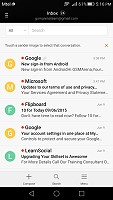
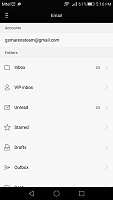
The Gmail app • The generic email client
The P8 keyboard features some additional settings thanks to its Swype integration, including themes, split keyboard modes, and keyboard height, but sadly many of them are hidden within the input settings menu rather than as shortcuts from the keyboard like on most interfaces.
Still, there is support for gestures as well as integration of Google's voice typing with their downloadable language voice recognition packs.


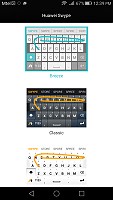

Huawei keyboard with Swype integration


Tip us
2.1m 180k
RSS
EV
Merch
Log in I forgot my password Sign up