Enter the Snapdragon
Samsung Galaxy S Plus review: Enter the Snapdragon

Good connectivity
The I9001 Galaxy S Plus has its connectivity bases covered: worldwide ready quad-band GSM/GPRS/EDGE and tri-band HSPA with download rates of up to 14.4 Mbps and 5.76 Mbps of upload - that's twice as fast HSDPA speed as that of its predecessor, the original Galaxy S and it really brings the Galaxy S Plus to current standards of 3G speed.
Similar to the first Galaxy S phone – the I9001 offers Wi-Fi (b/g/n), the new Bluetooth v3.0 with A2DP support and USB v2.0. The USB interface is standard microUSB, which makes finding a suitable cable a lot easier.
Besides its 8GB of integrated storage, the Samsung I9001 Galaxy S Plus supports microSD cards of up to 32GB. The slot is under the battery cover. There is also 2GB of ROM, with 1.5 GB free space for app installation.
The 3.5 mm standard audio port completes the connectivity tally. You can keep your favorite headphones and use them with the Galaxy S Plus hassle-free.
Great web browser
Solid web browsing has been an inherent part of Android since day one. Version 2.3.3 Gingerbread is the fastest yet – and there’s Flash to really open up the Web (which for better or worse still relies heavily on Flash for video streaming and navigation).
The web browser chrome is out of sight by default. Once the page loads, all you see is the URL bar and the bookmark button on a line at the top of the screen. Once you zoom in and pan around though even that line disappears (scroll to the top or press menu to bring it back).

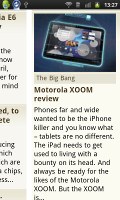
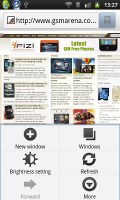
Android browser
That way you have the entire 4” screen for web browsing. The Galaxy S Plus browser supports two zoom methods – double tap and pinch-zooming.
The browser supports text reflow, but it works only with double tap zooming – a moment after setting the zoom level, columns of text align to fit the screen width. Without text reflow you will either have to zoom out until the text fits (but then it’s too small to read comfortably) or scroll sideways to read each line.
The minimalist UI is quite powerful – hit the menu key and six keys pop up. You can open a new tab, switch tabs, refresh the page, go forward, and open bookmarks. The final button reveals even more options (text copying, find on page, etc.).
The bookmark list shows a thumbnail of the bookmarked page and you also get a “most visited” list in addition to the history.
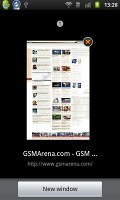
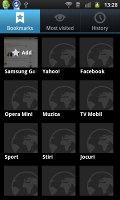


Tabs • Bookmarks • Most visited • History
The 1.4 GHz Snapdragon processor inside the Galaxy S Plus gives a shoulder of support to watching videos right inside the browser. It can play YouTube videos up to 720p trouble free. With the original Galaxy S you get a more laggy experience while loading 720p videos in the browser. With the Galaxy S Plus there's a significant amount of snappiness. Flash games in the browser were no problem either. We used Kongregate as our testing playground.


Playing 720p Flash video in browser • Playing a Flash game
Pages look nice on the ample 4” SuperAMOLED display, although it’s not the same experience as on the bigger, superior SuperAMOLED Plus screen.
Music & Social Hubs
The Music Hub app lets you browse music online with search, charts, new releases and featured content. You can preview songs (30 seconds each) and buy tracks or whole albums.

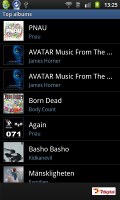
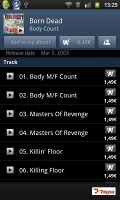
The Music Hub
The Social hub combines you email accounts with social networking (Facebook, Twitter, MySpace, LinkedIn) and IM accounts (Gtalk, MSN and Yahoo! Messenger) and shows all incoming messages as one list with handy shortcuts to reply, mark as favorite and so on. There’s filtering by message source too, to help manage the inflow of incoming updates.


Tip us
2.1m 180k
RSS
EV
Merch
Log in I forgot my password Sign up