Something to look forward to
Android 7.0 Nougat review: Something to look forward to
Seamless updates and faster app installs
For future phones and tablets, seamless updates (borrowed from Chrome OS) mean download and installation will take place in the background, and you'll only need to reboot once they're complete.
Oh, and reboots after applying updates shouldn't take longer than usual thanks to that pesky "Android is upgrading" and "Optimizing apps" screen finally being killed by the brand new JIT compiler. This also helps cut down app installation and update times compared to Marshmallow - and that's an improvement you're bound to see from day one, especially on devices that historically struggled with such a workflow (the Nexus 9 comes to mind here).
While the seamless update process can't be implemented on current phones and tablets for technical reasons, the rest of the functions described here are available for all devices running Nougat.
Other small things
- Call blocking works differently. The setting is still found in the default Phone app, but it will now block numbers at the system level, and the call blocking list is accessible to third party apps too. Once you add a number to the new list, you won’t get any calls or texts from it. The first time you go into Call blocking after installing Nougat you’ll get a notice that the functionality has changed;
- Do Not Disturb mode got even smarter, by letting you choose to automatically end it when an alarm goes off;
- In Emergency Information you can add new details such as your blood type and allergies alongside an emergency contact and your name - and emergency responders can view the data from your lock screen;
- Unicode 9 emoji are redesigned, more human-looking, and come with multiple skin tones;
- There’s a new and improved face recognizer which can be used as a security measure instead of a PIN, password, pattern, or the fingerprint sensor. This is now part of Smart Lock and is less sensitive to lighting conditions, whether or not you have eyewear or facial hair, and how you hold your phone. It’s still less secure than any of the other options though;
- Android Backup covers more settings now, including accessibility options, run-time permissions for apps, Wi-Fi hotspot settings, and Wi-Fi network restrictions. All of these should be automatically backed up and restored when needed;
- You can select multiple languages in Settings so that you can perform searches in more than one language and won’t be offered translations of web pages that are in one of the languages you know, and you can sort your preferences so that apps can accurately pick the right keyboard and text type for you.

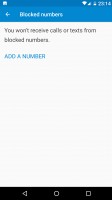
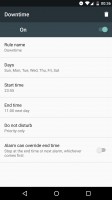
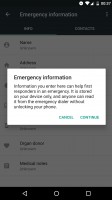
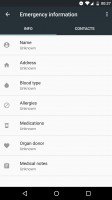
New call blocking menu, Do Not Disturb ending on alarms, Emergency information screens
Under-the-hood stuff
Android 7.0 comes with a new graphics API called Vulkan, which should enable much better 3D game graphics on devices with powerful enough hardware to support it. The latest version of the OS also has a built-in Virtual Reality mode, which will only be visible on Daydream-ready devices, this being Google's new grand VR push. Expect to see Daydream-certified handsets as well as a Google-made Daydream VR headset to put your phone into by the end of the year.
With Direct Boot, essential services start running even before you enter your password when you turn your device on. So you'll get notifications and hear alarms as soon as possible. Finally, with file-based encryption, your files are better isolated and protected than they were in the past with block-level encryption. However, only devices launching with Nougat on board will get Direct Boot and file-based encryption by default. For those who update to Android 7.0, the choice to switch to file-based encryption is available in Developer options, but doing this requires a full wipe of all your data, so we'd guess it's not something most people will even consider.


Tip us
2.1m 180k
RSS
EV
Merch
Log in I forgot my password Sign up