Samsung Galaxy A51 review
Android 10 and One UI 2 out of the box
The Galaxy A51 is one of the first Samsung phones to boot Android 10 out of the box, complete with the latest custom One UI 2.0. It's nice to see that new models are launching with their software already up to date, as opposed to having to wait several months for an OTA.
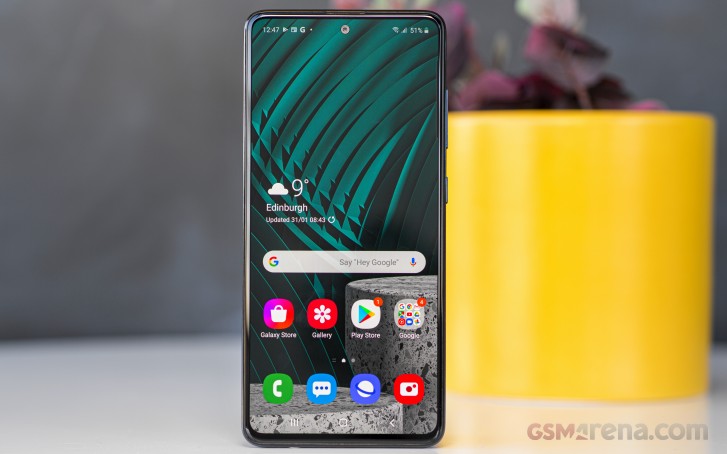
We've already seen the 10/2.0 combo on several flagship Galaxies, where it arrived as an update. On top of that, the second version of One UI isn't all that different from the original, save for the new take on gesture navigation. Even so, the A51's build comes with a small surprise - you get Edge screen.
Previously reserved for the flagships where they would go together with the curved edge displays, the Edge screen set of features have made their way to the mostly flat-screened Galaxy A51. Edge panels is a well-known, long-standing feature that gives you quick access to apps, actions, tools, etc. with a single swipe from the side. You can choose which side the handle is located on, as well as adjust its position along the edge of the phone. In the Edge screen sub-menu, you will also find Edge lighting - it's a feature that can light up different types of peripheral glow for notifications, and as you've probably guessed, there are tons of options and styles to choose from.
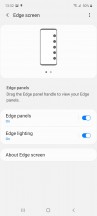





Edge screen
Gesture navigation is also available, and you get to pick between the One UI 2 set of actions or go back to the One UI 1 way of doing things. The former is similar to the current native Android 10 approach with a swipe-in from the sides for 'Back' and swipe-up from the bottom for Home or task switcher. The old way is by swiping up from three separate areas on the bottom that do what the on-screen buttons before them used to do. If you can't be bothered with gesturess, the conventional onscreen nav bar remains an option too.
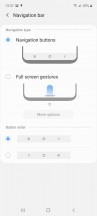
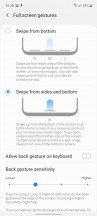
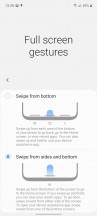
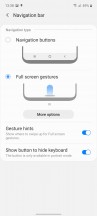
Navigation options
Other cool recent developments have made their way to the A51, including Dark mode. It skins UI elements in black and shades of dark gray and also invokes the dark modes of supported apps, which include the in-house ones as well as the Google suite (not Maps, though, not yet).
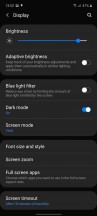
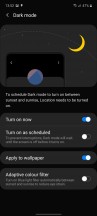

Dark mode
Biometrics on the Galaxy A51 include an optical fingerprint reader and basic camera-only face detection. The fingerprint reader experience is trouble-free, with the usual multi-step setup feeling a bit tedious but rewarding when it comes to accuracy afterwards.
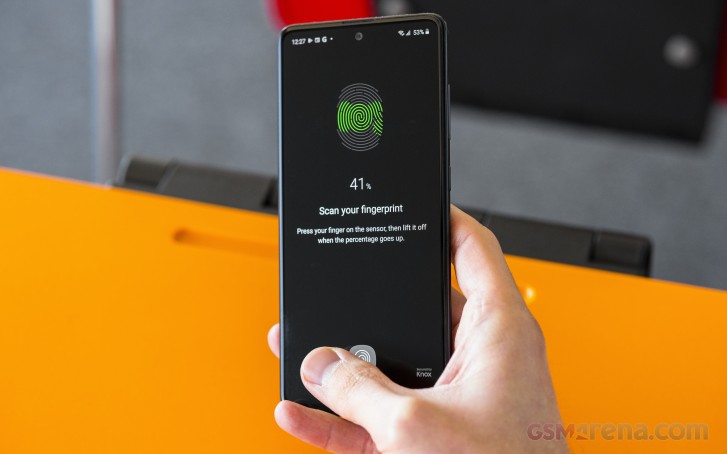
It's not the fastest of sensors and feels more like Samsung's ultra-sonic units in the flagships as opposed to a good, nearly-instant optical one, and the laggy animation doesn't help with perceived speed, but it's mostly a usable reader that doesn't get in the way.




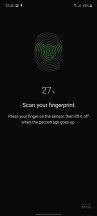
Settings • Biometrics
Other than that, the Galaxy A51's UI is One UI as we've come to enjoy. The shift of actionable UI elements towards the bottom for easier reach has been widely praised, and we're also digging the iconography.






Lockscreen • Homescreen • Folder view • App drawer • Notification shade • Task switcher
Synthetic benchmarks
The Galaxy A51 is powered by the in-house Exynos 9611 chipset - a minor refresh on the 9610 found in last year's model, and a refresh that only addresses high-res camera support. In fact, we did see an uptick in performance on the M30s, which uses the 9611 too, so there's probably more than meets the eye in the specsheets.
Anyway, this particular Exynos is built on a 10nm process and packs an octa-core CPU in a classic 2x4 configuration - 4x2.3GHz Cortex-A73 & 4x1.7GHz Cortex-A53. The GPU is Mali-G72 MP3. Three RAM/storage versions are in existence - 4/64GB, 4/128GB, and 6/128GB, with our review unit being the mid spec.
In our benchmarking session, the Galaxy A51 proved it's not up to the standard set by competitors in the price range. The Snapdragon 730 present in the Realme X2 and the Xiaomi Mi 9T is significantly more powerful in all applications, be it CPU- or GPU-intense. The Huawei Nova 5T that relies on the once flagship Kirin 980 SoC is in a class of its own, yet fits the budget. The A51 is keeping company to the Nokia 7.2 in terms of CPU performance, but even that ancient Snapdragon 660 in the 7.2 has better graphics than the Galaxy.
GeekBench 4.4 (multi-core)
Higher is better
-
Huawei nova 5T
10013 -
Xiaomi Redmi K30
7008 -
Realme X2
6926 -
Xiaomi Mi 9T
6863 -
vivo V17 Pro
6629 -
Samsung Galaxy A70
6584 -
Samsung Galaxy A60
6582 -
Motorola Moto G8 Plus
5641 -
Xiaomi Redmi Note 8T
5620 -
Samsung Galaxy M30s
5566 -
Nokia 7.2
5440 -
Samsung Galaxy A51
5401 -
Samsung Galaxy A50
5396 -
Samsung Galaxy M30
4188
GeekBench 4.4 (single-core)
Higher is better
-
Huawei nova 5T
3342 -
Xiaomi Redmi K30
2558 -
Xiaomi Mi 9T
2537 -
Realme X2
2508 -
Samsung Galaxy A70
2391 -
Samsung Galaxy A60
2388 -
vivo V17 Pro
2382 -
Samsung Galaxy A50
1715 -
Samsung Galaxy A51
1668 -
Nokia 7.2
1534 -
Motorola Moto G8 Plus
1530 -
Xiaomi Redmi Note 8T
1519 -
Samsung Galaxy M30s
1489 -
Samsung Galaxy M30
1311
GeekBench 5.1 (multi-core)
Higher is better
-
Huawei nova 5T
2504 -
Realme X2
1750 -
Xiaomi Mi 9T
1703 -
Xiaomi Redmi K30
1692 -
Samsung Galaxy A60
1602 -
Nokia 7.2
1398 -
Motorola Moto G8 Plus
1385 -
Samsung Galaxy A51
1294 -
Samsung Galaxy M30s
1288
GeekBench 5.1 (single-core)
Higher is better
-
Huawei nova 5T
696 -
Xiaomi Redmi K30
548 -
Realme X2
545 -
Xiaomi Mi 9T
542 -
Samsung Galaxy A60
507 -
Samsung Galaxy M30s
349 -
Samsung Galaxy A51
347 -
Nokia 7.2
332 -
Motorola Moto G8 Plus
310
AnTuTu 7
Higher is better
-
Huawei nova 5T
313024 -
Xiaomi Redmi K30
218200 -
Realme X2
215578 -
Xiaomi Mi 9T
211915 -
vivo V17 Pro
176791 -
Samsung Galaxy A60
170102 -
Samsung Galaxy A70
167750 -
Samsung Galaxy M30s
152075 -
Samsung Galaxy A50
144574 -
Xiaomi Redmi Note 8T
141077 -
Nokia 7.2
139495 -
Samsung Galaxy A51
113051 -
Samsung Galaxy M30
101651
AnTuTu 8
Higher is better
-
Huawei nova 5T
395503 -
Xiaomi Redmi K30
272229 -
Realme X2
257443 -
Xiaomi Mi 9T
257146 -
Samsung Galaxy A60
209933 -
Samsung Galaxy M30s
180321 -
Samsung Galaxy A51
175363 -
Motorola Moto G8 Plus
168699 -
Xiaomi Redmi Note 8T
167395 -
Nokia 7.2
164484
GFX 3.1 Manhattan (1080p offscreen)
Higher is better
-
Huawei nova 5T
56 -
Xiaomi Redmi K30
30 -
Realme X2
29 -
Xiaomi Mi 9T
27 -
vivo V17 Pro
17 -
Samsung Galaxy M30s
16 -
Samsung Galaxy A70
15 -
Samsung Galaxy A60
15 -
Nokia 7.2
15 -
Samsung Galaxy A50
14 -
Xiaomi Redmi Note 8T
13 -
Motorola Moto G8 Plus
13 -
Samsung Galaxy A51
10 -
Samsung Galaxy M30
8.1
GFX 3.1 Manhattan (onscreen)
Higher is better
-
Huawei nova 5T
48 -
Xiaomi Redmi K30
27 -
Xiaomi Mi 9T
24 -
Realme X2
24 -
vivo V17 Pro
14 -
Samsung Galaxy M30s
14 -
Samsung Galaxy A50
13 -
Samsung Galaxy A70
13 -
Samsung Galaxy A60
13 -
Nokia 7.2
13 -
Motorola Moto G8 Plus
12 -
Xiaomi Redmi Note 8T
11 -
Samsung Galaxy A51
8.9 -
Samsung Galaxy M30
7.3
GFX 3.1 Car scene (1080p offscreen)
Higher is better
-
Huawei nova 5T
33 -
Xiaomi Redmi K30
17 -
Xiaomi Mi 9T
16 -
Realme X2
16 -
Samsung Galaxy M30s
10 -
Samsung Galaxy A50
9.2 -
Nokia 7.2
9 -
vivo V17 Pro
8.8 -
Samsung Galaxy A60
8.1 -
Samsung Galaxy A70
8 -
Motorola Moto G8 Plus
7.1 -
Xiaomi Redmi Note 8T
7 -
Samsung Galaxy A51
6.6 -
Samsung Galaxy M30
5.2
GFX 3.1 Car scene (onscreen)
Higher is better
-
Huawei nova 5T
29 -
Xiaomi Redmi K30
15 -
Xiaomi Mi 9T
13 -
Realme X2
13 -
Samsung Galaxy M30s
8.7 -
Nokia 7.2
8.1 -
Samsung Galaxy A50
8 -
Samsung Galaxy A60
7.3 -
vivo V17 Pro
7.3 -
Samsung Galaxy A70
7 -
Motorola Moto G8 Plus
6.5 -
Xiaomi Redmi Note 8T
5.9 -
Samsung Galaxy A51
5.6 -
Samsung Galaxy M30
4.6
3DMark SSE OpenGL ES 3.1 1440p
Higher is better
-
Huawei nova 5T
4418 -
Honor 20
3973 -
Xiaomi Redmi K30
2467 -
Realme X2
2402 -
Xiaomi Mi 9T
2182 -
Samsung Galaxy A50
1889 -
Samsung Galaxy A51
1574 -
Samsung Galaxy M30s
1425 -
Nokia 7.2
1333 -
Motorola Moto G8 Plus
1125 -
vivo V17 Pro
1089 -
Samsung Galaxy A60
984 -
Samsung Galaxy A70
974 -
Samsung Galaxy M30
636
3DMark SSE Vulkan 1440p
Higher is better
-
Huawei nova 5T
4352 -
Realme X2
2263 -
Xiaomi Redmi K30
2244 -
Honor 20
2219 -
Xiaomi Mi 9T
2035 -
Samsung Galaxy A51
1554 -
Samsung Galaxy M30s
1502 -
Samsung Galaxy A50
1388 -
Nokia 7.2
1277 -
vivo V17 Pro
1163 -
Samsung Galaxy A60
1070 -
Samsung Galaxy A70
1061 -
Motorola Moto G8 Plus
1037 -
Samsung Galaxy M30
727


Tip us
2.1m 180k
RSS
EV
Merch
Log in I forgot my password Sign up