Young as you feel
Nokia 5800 XpressMusic review: Young as you feel
Connectivity duly covered
Smartphones are usually well-heeled in terms of connectivity. Nokia 5800 XpressMusic makes no exception: all contemporary means of data transfer are supported.
Both USB and Bluetooth are version 2.0 and the latter naturally also sports A2DP. Wi-Fi with UPnP support is also at hand.
All kinds of network connectivity are at the user disposal - GPRS, EDGE and 3G with HSDPA.
By the way if you are want to know which version of the 5800 XpressMusic you should get - the one with dual-band 900/2100 MHz UMTS or the 850/1900 MHz variety you might want to consult our Worldwide Network Bands distribution database.
Finally, the Nokia 5800 XpressMusic has a memory card slot, which can usually give you the fastest data transfer rates.
Web browser is a mixed bag
The web browser of Nokia 5800 XpressMusic is about the same as on the latest S60 3rd edition devices. This is a real pity. A great browser already, it could've simply kicked butt on a touchscreen device. But not this time, folks. Apparently Nokia either lacked the time or the will, so we're left with not the best touch-optimized version of the browser we know and appreciate.
Panning is the only thing that is done by sweep gestures here, and zoom is controlled by tapping on the screen. However the three zoom steps that are controlled via taps aren't the most suitable we can think of. Those include fit to width, fit to height and a third one, which seem to have no reasonable explanation. The first two are however always assuming that you use the handset in portrait position, which gets quite annoying at times.
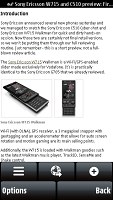
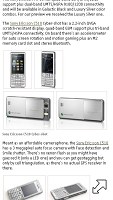
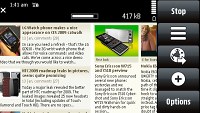
The web browser has much room for improvement
Furthermore, even if you happen to be in portrait mode and choose the fit-to-width zoom level, the text does not automatically center onscreen. Instead you will have to align it manually, which is nonsense really.
At least the page rendering algorithm is quite good, making all the pages look as if browsed from a desktop PC. The high resolution is also a welcome bonus here, as it allows more content to fit on the screen.
Finally, the web browser has full support for both Flash and Java, which means that you can enjoy flash videos straight from your browser without having to use the mobile versions of sites like YouTube.
So, generally speaking, the first S60 touch-browser is quite a disappointment. The only advantage over previous versions is sadly not touchscreen, but display resolution. And that's seriously undermined by the not so good software implementation. We certainly hope Nokia invest enough effort to make one of the most important applications more user-friendly.
Time-management capabilities are good enough
The S60 organizer didn't obviously get too much effort beyond the actual touch optimization. Well, developers were right up to a point but, given the progress of most competitors, some new functionality would have been nice - like copy/paste of events in the calendar or a new calculator. We have to admit though that the calculator is much more comfortable operating with fingers than with a D-pad, almost as if it was designed for such use from the very beginning. Now let's just hope new non-touchscreen devices get something better.
The calendar has four different view modes - monthly, weekly, daily and to-do, which allows you to check up all your To-Do entries regardless of their date. There are the same four types of events available for setting up as on S60 3rd edition - Meeting, Memo, Anniversary and To-do. Each event has unique fields of its own, and some of them allow an alarm to be activated at a preset time to act as a reminder.
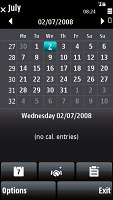
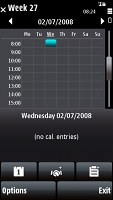
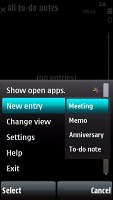
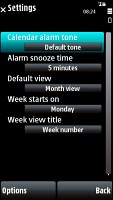
Some of the calendar viewss and available settings
Mobile office is also very well geared, with preinstalled applications able to open Word, Excel and PowerPoint files seamlessly. The PDF viewer wasn't preinstalled on our unit but you can get it free off the Nokia download center.
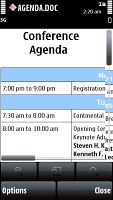
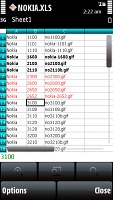

Only viewing of documents is supported out of the box
Unluckily, editing documents is not supported by the included Quickoffice version. If you would like editing enabled you will have to get the upgrade from the Nokia Download center for a fee.
The organizer package also includes a great unit converter, calculator and voice recorder, as well as the Notes application.
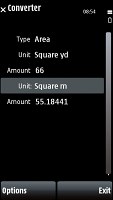
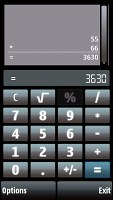
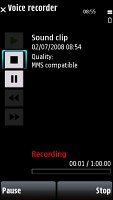
Some of the other organizer apps
The alarm application allows you to set up as many alarms as you want, each with its own name, trigger day and repeat pattern. If this seems too complicated, there is a quick alarm setup where all you do is set the time and you're good to go. This is quite convenient for, say, setting up your wake-up alarm. In addition, the number of alarms is not limited. Thanks to the built-in accelerometer you can also snooze the alarm by simply flipping your phone, much like with the Nokia 8800 Arte.
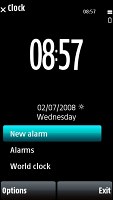
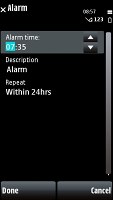
We are quite fond of the alarm application


Tip us
2.1m 180k
RSS
EV
Merch
Log in I forgot my password Sign up