Asian blade
Oppo R819 review: Asian blade

Hardware
The proximity and ambient light sensors are on the side of the earpiece above the screen. A little to the right is the 2MP front-facing camera, which has a wide 88° lens that really makes a difference in video chatting.
Below the screen are three capacitive buttons - Menu, Home and Back. Oppo uses this arrangement (so does Samsung), even though on-screen buttons have been preferred since ICS and the Menu button has been largely replaced by the app switcher button.


88°-angle front-facing camera • capacitive keys
The left side of the Oppo R819 holds the Power/Lock key, which isn't needed strictly speaking. You can wake the phone with a double tap and lock it with the provided Lock Now shortcut.
Also here is the microSIM card tray, which has to be opened with a SIM eject tool (though the curve towards the back allowed us to pry it open with a fingernail). If you're wondering where the second SIM goes, the R819 uses a single tray for both cards. The innermost card is SIM1, the outer is SIM2.


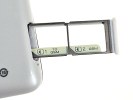
Left side with Power/Lock key and SIM card tray
The good thing about this design is that you can slide out only half of the tray, pop in a new card and push it back in. The phone will detect the new card, show you what the current settings are (preferred card for calls, texts, that sort of thing). It will then prompt you to restart (cycling Airplane mode didn't work).
The right side of the Oppo R819 just holds the volume rocker. On top there's the 3.5mm audio jack. There's a thin silver strip running around the sides of the phone and is really the only decorative element.


Volume rocker on the right • 3.5mm audio jack on top
At the bottom of the phone is a microUSB port (with no USB OTG functionality) and the main mic. The secondary mic is on the back, near the camera.


microUSB port and main mic
Speaking of the camera, it's very near the top edge of the back and protrudes slightly so you should be careful not to put a finger in front or get it scratched. Oppo is bragging about its 5-element lens design with UV coating and blue glass (to filter out IR light). The sensor is Back Side Illuminated and the lens has an F/2.0 aperture, which should help it in low-light shots. There's an LED flash for that too.


The back of the Oppo R819 • 8MP camera • loudspeaker
The loudspeaker grille is near the bottom of the back.
Battery life
The Oppo R819 has a 2,000mAh non-removable battery - not bad for such a thin phone, plus some competing dual-SIMs have smaller batteries. What really makes a difference for the battery life, however, is the efficient modem - power draw during standby and in a call is very low, so the R819 battery loses little charge during the night and over a few hours of calls.
The chipset and bright screen proved to be more power hungry and the web browsing and video playback times are less impressive, though (but still not bad).

You can read more about the Oppo R819's battery life here.


Tip us
2.1m 180k
RSS
EV
Merch
Log in I forgot my password Sign up