Android sidearm
Motorola MILESTONE XT720 review: Android sidearm
The usual phonebook
The smartphone phonebook can store a serious amount of information about your contacts. It lets you input numbers for work and home, and you can even create custom labels. There is of course an email field and you can assign a custom ringtone.
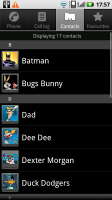
The MILESTONE XT720 phonebook is pretty good
The Quick contact feature introduced by Android 2.0 allows you to call, text, or email the person with a single click on their photo (or photo placeholder).
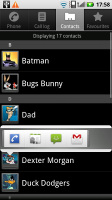

The quick contacts brought by Android 2.0 are quite convenient
You can add an IM nickname to a contact as well as a postal address, company and job title, several notes, you name it. Quite interesting is the option to redirect calls directly to voicemail.
There are many info fields that you can assign to each contact, but it still remains perfectly organized. You have all the types listed (numbers, email addresses, etc) and there's a plus sign on the right - clicking it adds another item of that type. Pressing the minus sign under it deletes the unneeded field.
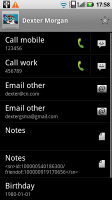

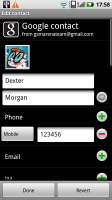
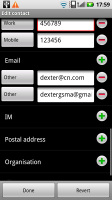
Editing a contact's details
When viewing a contact the various details are displayed in sections. There is a Dial number and a Send SMS/MMS tab with the numbers for the contact listed. Each number fills an entire horizontal row so that it's more thumbable.
Email also has a dedicated tab that works just like the one for numbers. The rest of the information (if any) is displayed underneath.
You can "star" a contact, which puts it in the Favorites tab. Also, in each Gmail account there's a special group called "Starred in Android" where these contacts go automatically.
Adding a photo to a contact is quite easy: when you select a photo, a cropping tool comes up allowing you to use any part of the image you want. Adding a photo has another pleasing "side effect" - if you put a dialing shortcut for the contact on the screen, it uses the photo as an icon.
Searching for a contact in the phonebook is quite easy - just hit the search key and a search box pops up.
Telephony: no smart dialing
The Motorola MILESTONE XT720 had no issues with reception and in-call quality. The ringer is loud enough so you don’t need to always set the volume to maximum.
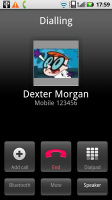
The in-call screen
Unfortunately, the MILESTONE XT720, just like the rest of the Motorola’s droid crew doesn’t feature Smart dialing.
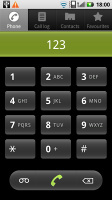
No smart dialing again
In Android, the phonebook, call log and dialer are all part of the same application. You can easily search them by flick scrolling. Voice dialing is not available though.
Thanks to the proximity sensor the Motorola MILESTONE XT720 automatically switches off its touchscreen when you hold in next to your ear for a call. There is no chance of ever hitting an on-screen button with your cheek on this one.
The call log shows all the dialed, received and missed calls all in one list.
We also ran our traditional loudspeaker test on the Motorola MILESTONE XT720. The MILESTONE XT720 snatched a good mark, meaning missed calls are only likely in noisier environments. More info on our loudspeaker test as well as other results can be found here.
| Speakerphone test | Voice, dB | Ringing | Overall score | |
| Apple iPhone 4 | 65.1 | 60.3 | 66.2 | |
| Samsung I9000 Galaxy S | 66.6 | 65.9 | 66.6 | |
| Motorola MILESTONE XT720 | 66.2 | 65.8 | 77.0 | Good |
| Motorola MILESTONE | 69.7 | 78.0 | 66.2 | Good |
| Google Nexus One | 69.9 | 66.6 | 79.1 | Good |
| HTC Hero | 76.7 | 71.9 | 77.7 | Very Good |
| HTC Desire | 76.6 | 75.7 | 84.6 | Excellent |


Tip us
2.1m 180k
RSS
EV
Merch
Log in I forgot my password Sign up