GSMArena.com GSMArena.com

Tip us

2.1m
180k
RSS

EV

Merch

Log in

Login

I forgot my password
Sign up
  • Home
  • News
  • Reviews
  • Videos
  • Featured
  • Phone Finder
  • Deals
  • Merch
  • Coverage
  • Contact
ADVERTISEMENT
GSMArena team, 25 January 2013

Half-press to play


Samsung Galaxy Camera review: Half-press to play
  • Comments (84)
  • User reviews
  • Galaxy Camera GC100

5. Video camera and quality
  1. 1. Introduction
  2. 2. Design and build quality
  3. 3. User interface
  4. 4. Still camera and quality
  5. 5. Video camera and quality
  6. 6. Gallery and file browser, Instagram, image editors
  7. 7. S Voice and Google Now, synthetic benchmarks
  8. 8. Contact, loudspeaker, messaging
  9. 9. Music and video players
  10. 10. Audio quality, connectivity, web browser
  11. 11. Organizer, Google Play Store and Maps
  12. 12. Conclusion
  13.  
  14. Samsung Galaxy Camera GC100 specification
  15. User opinions and reviews
  16. Review comments (84)

Samsugn Android Touch UI

Video recording introduces 60fps mode

The Samsung Galaxy Camera shoots 1080p videos at 30fps, but can also do 720p clips in either 30fps or 60fps. The second option shoots high framerate (HFR) similar to The Hobbit movie (which used 48fps). There's also a 120fps slow-mo mode at a reduced resolution.

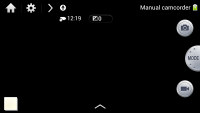
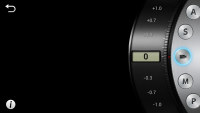
The camcorder doesn't get a dedicated UI - instead you just press the record video on-screen button and it starts recording. In Auto mode you don't even get a 16:9 viewfinder, you have to switch to Expert Movie mode to get that.
Samsung Galaxy Camera GC100 Review Samsung Galaxy Camera GC100 Review
The camcorder uses the same UI as the still camera

The Galaxy Camera features 21x zoom that you can use during video recording. A nice option here is the Quiet zoom, which makes sure the zoom sound isn't recorded (it's barely audible even with that option off).

Optical image stabilization is the other big advantage that the Galaxy Camera lens has, we tested it against the digital stabilization of the Nokia 808 PureView and it did impressively.

The 1080p videos are smooth, noise-free and with good details and color. Contrast in videos is low and the continuous autofocus triggers too often (there's no way to disable it). Another problem is that the videos are visibly oversharpened.

The video container used is mp4 and it creates clips with a bitrate of about 17-18Mbps, of which 128Kbps are for the stereo sound, recorded at 48 kHz sampling frequency.

You can download an untouched 1080p@30fps video sample from here (0:09s, 18.8MB).

720p HFR videos are quite impressive - we call 30fps videos "smooth", but 60fps brings a whole new level of smoothness. 720p@60fps videos have a slightly surreal quality and they might not be for everyone (we're just so used to 24-30fps that anything else looks odd). However, if you're going to record fast moving objects or do a lot of panning, the limitations of 30fps will make themselves apparent, while 60fps videos will remain buttery smooth.

Note that the doubled framerate makes up for the halved resolution and the mp4 files still have around 17Mbps bitrate.

Unfortunately, YouTube doesn't support 60fps videos and turns them into 30fps videos instead. This limits how you can share your videos. Here's a short sample (0:07s, 14MB) that gives you a taste of how 60fps videos look.

Yet another mode on the Samsung Galaxy Camera is the 120fps slow-mo (4x) video recording. Videos are shot at 768 x 512 resolution but still look pretty decent.

Video quality comparison

The Video Quality Compare tool is where you can observe how each of our contenders handles changes in lighting, what actual resolution they achieve in FullHD recording and what levels of detail are produced.


Video Compare Tool Video Compare Tool Video Compare Tool
Samsung Galaxy Camera in the Video Compare Tool

Next Page » 6. Gallery and file browser, Instagram, image editors
5. Video camera and quality
  1. 1. Introduction
  2. 2. Design and build quality
  3. 3. User interface
  4. 4. Still camera and quality
  5. 5. Video camera and quality
  6. 6. Gallery and file browser, Instagram, image editors
  7. 7. S Voice and Google Now, synthetic benchmarks
  8. 8. Contact, loudspeaker, messaging
  9. 9. Music and video players
  10. 10. Audio quality, connectivity, web browser
  11. 11. Organizer, Google Play Store and Maps
  12. 12. Conclusion
  13.  
  14. Samsung Galaxy Camera GC100 specification
  15. User opinions and reviews
  16. Review comments (84)

Reviews Samsung Galaxy Camera reviewPage 5
  • Comments (84)
  • User reviews
  • Galaxy Camera GC100

Phone finder

  • Samsung
  • Apple
  • Huawei
  • Nokia
  • Sony
  • LG
  • HTC
  • Motorola
  • Lenovo
  • Xiaomi
  • Google
  • Honor
  • Oppo
  • Realme
  • OnePlus
  • Nothing
  • vivo
  • Meizu
  • Ulefone
  • Alcatel
  • ZTE
  • RugOne
  • Umidigi
  • Fairphone
  • Oscal
  • Sharp
  • Micromax
  • Infinix
  • Asus
  • Tecno
  • Doogee
  • Blackview
  • Cubot
  • Oukitel
  • Itel
  • TCL

All brands Rumor mill

ADVERTISEMENT

Popular reviews

Apple iPhone 18 Pro Max review
Apple iPhone 18 Pro review
Galaxy Tab S12 Ultra review
ADVERTISEMENT

ELECTRIC VEHICLES

2026 BMW i5 xDrive40 real life range test with 19-inch wheels and summer tires 2026 BMW i5 xDrive40 real life range test with 19-inch wheels and summer tires Interior of the new BYD Seal 07 reveals a grownup designAustralia and New Zealand join long list of Cybertruck-less countries
ADVERTISEMENT
Ads by Playwire

Home News Reviews Compare Coverage Glossary FAQ RSS Youtube Instagram TikTok Facebook Twitter

© 2000-2026 GSMArena.com Mobile version Android app Tools Contact us Merch store Privacy Terms of use